

Password Behavior in SFX RAR Installers: Formats, Limits, and Safety Notes
Self-extracting (SFX) RAR installers feel convenient: you double-click one file, see a familiar dialog, and everything “just extracts.” But when a password is involved, the behavior of that SFX package can suddenly become confusing. A prompt appears in a different place than you expected, extraction stops without clear explanation, or the installer fails on some systems but not others.
If you created these SFX archives years ago, you might now be missing the exact password, unsure whether the file is damaged, or worried that running the installer could harm fragile data. On top of that, you still need to respect privacy, legal boundaries, and corporate policies while trying to regain access to your own content.
This article explains how passwords behave inside SFX RAR installers, what the format can and cannot do, and how to evaluate your options safely. The goal is to help you understand behavior and limitations first, so that any later recovery or repair steps stay lawful, privacy-first, and technically realistic.
🧭 Navigation
Important
The information provided in this article applies exclusively to RAR / WinRAR archives for which you have full, demonstrable ownership or properly documented authorization. If you are not the rightful owner of the data, do not directly control it, or cannot clearly prove permission to access it, you must stop immediately. Attempting to access, recover, or modify data without explicit authorization may violate criminal law, civil statutes, corporate compliance requirements, and privacy regulations in many jurisdictions. You alone are responsible for ensuring that your actions are lawful and properly permitted before proceeding.
📌 TL;DR — High-Level Summary
Self-extracting (SFX) RAR installers are simply RAR archives wrapped in an executable shell. If the underlying archive is password-protected, the SFX container passes the password request to the same decryption engine WinRAR would use. That means:
- The password is not stored in plain text inside the SFX; instead, it is validated through strong encryption (RAR4 or RAR5, often with AES-256).
- The SFX UI can be misleading: you may see a generic failure dialog instead of a clear “wrong password” message, especially on older or customized SFX modules.
- Format limits still apply. If headers or filenames are encrypted, or if the archive is damaged, there may be very little diagnostic information exposed, even though the installer runs.
- Running a fragile SFX file repeatedly can increase risk if it writes partial output over the only copy of your extracted data or uses temporary paths you later overwrite.
Before any password guessing or repair efforts, you should:
- Confirm ownership and that you are working only with files you have a legitimate right to access.
- Make safe copies of the SFX file and, if present, related volumes or .rev recovery data.
- Diagnose what’s really wrong: password issue, corruption, format mismatch, or an environmental problem (OS, permissions, antivirus).
- Use offline, privacy-first tools for inspection and recovery so that encrypted corporate or personal data never leaves your machine.
From there, you can decide whether recovery attempts are technically realistic, what risks they carry, and when it’s better to focus on prevention and long-term access strategies for future SFX archives.
🔍 SFX RAR Installers and How They Package Passwords
An SFX RAR installer is essentially a small executable stub plus an embedded RAR archive. When you launch the file, the stub initializes the unpacking engine and presents dialogs that resemble an installer wizard. Under the surface, however, you are still dealing with a regular RAR or RAR5 archive, just in a different container.
Key points about structure:
- The core payload is a standard RAR/WinRAR archive (RAR4 or RAR5).
- The SFX stub is platform-specific executable code (usually Windows PE).
- Most SFX modules reuse the same decryption and decompression routines as WinRAR.
Because the core archive is still a RAR file, all high-level concepts like header encryption, recovery records, and multi-volume behavior still apply. Concepts explained in how SFX encryption protects your self-extracting RAR file ↗️ are directly relevant here: the visual wrapper may change, but the cryptographic rules do not.
SFX archives may also include additional logic such as post-extraction commands, temporary folders, or custom dialogs. None of those features weaken the underlying encryption by default; they just influence how you experience the password prompts and error messages.
🧠 How Passwords Behave Inside SFX Archives
When you run a password-protected SFX installer, several password-related behaviors come into play that can surprise users:
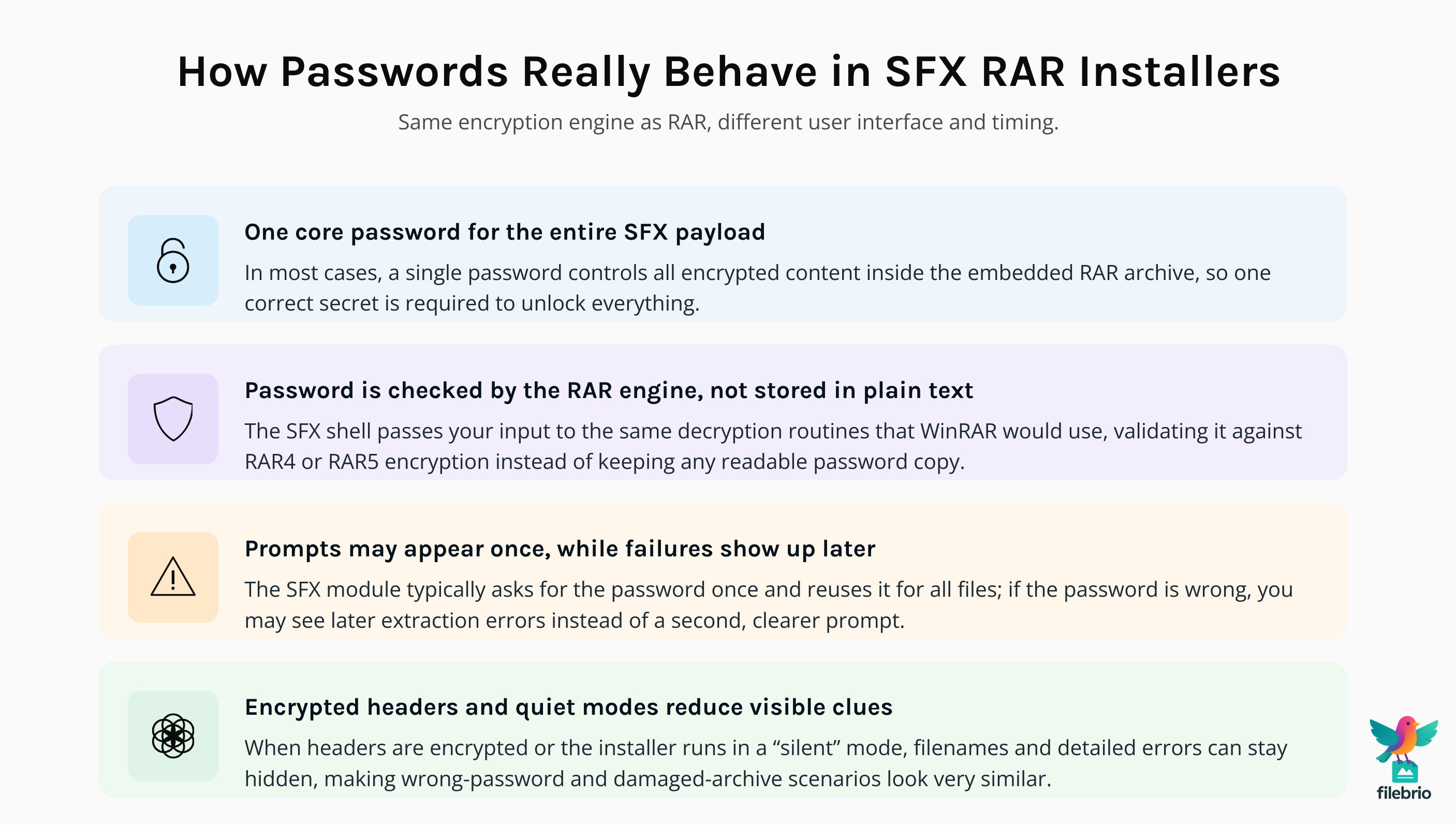
- Single password gate. In most cases, the same password controls all encrypted contents inside the SFX archive. If the archive uses a different password for some files, behavior becomes more complex and error-prone.
- Password prompts may appear only once. The SFX module usually requests the password once and reuses it for all extractions. If that password is wrong, you may see failures later in the process without a second prompt.
- Encrypted headers vs. visible file list. If headers are encrypted, you may not see filenames or sizes at all. If they are not, you might still see a file list even though the contents remain encrypted.
- Background extraction and silent errors. Some SFX modules run in “quiet” or “silent” modes, showing minimal UI while still validating the password in the background.
Because password validation happens at the archive level, you can often inspect the same SFX file with a non-executing tool that only reads metadata. Understanding RAR header flags and metadata, as described in how header flags reflect your RAR file’s health ↗️, can help you confirm whether the archive is actually encrypted, partially encrypted, or damaged.
In short, the SFX layer doesn’t make the password weaker or stronger. It simply changes when and how you see prompts and messages. But that layer can obscure important clues — especially when failures are reported generically instead of clearly distinguishing “wrong password” from “damaged archive.”
⚖️ Format Limits, Edge Cases, and Common Confusions
Different RAR generations (RAR4 vs. RAR5) and SFX modules bring their own quirks, but a few technical limits are especially important to understand before you make decisions about recovery or migration.
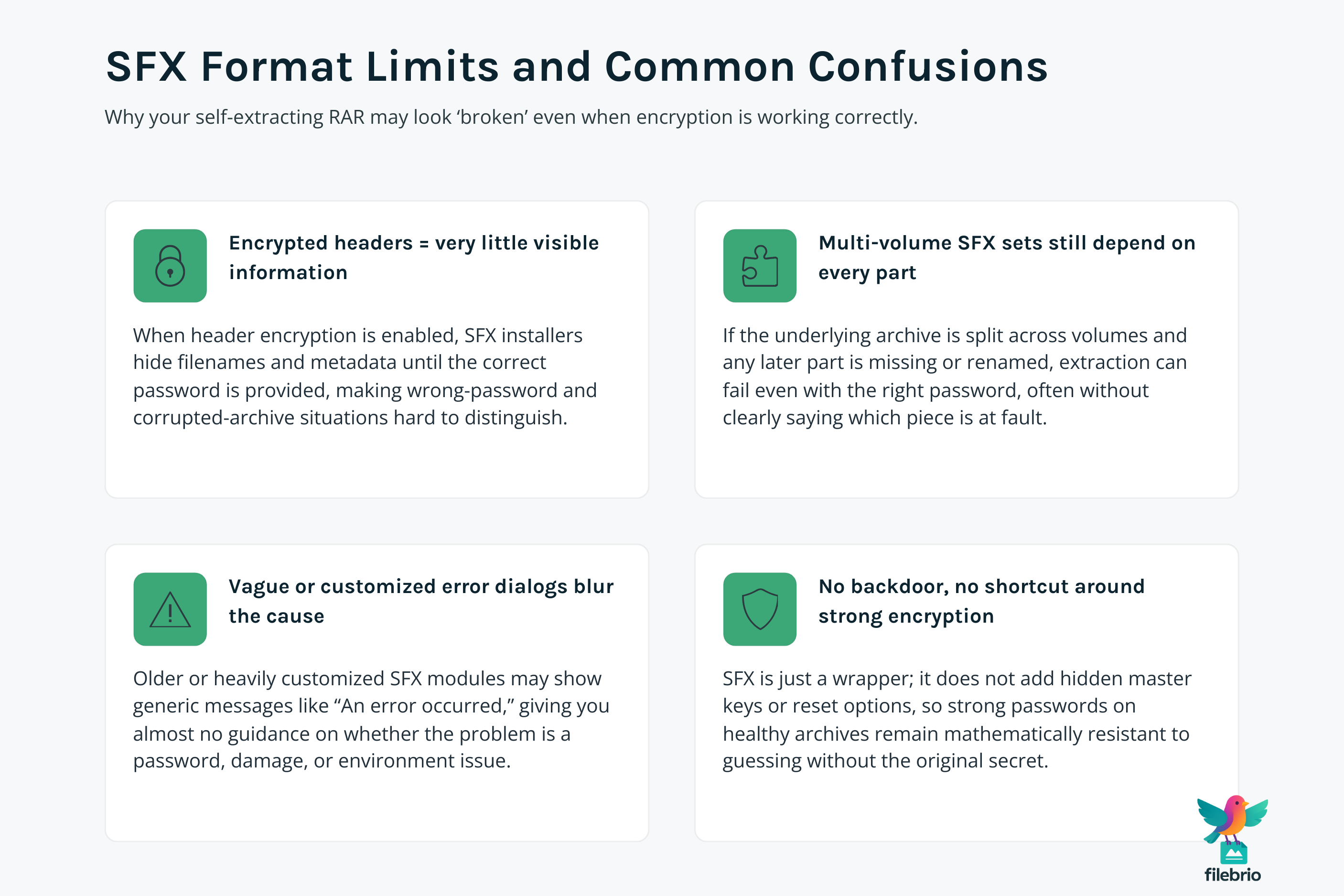
1. Encrypted headers shrink visibility
If header encryption is enabled, the SFX archive reveals very little to any tool — including its own UI. In that case:
- You may not see filenames or sizes until a correct password is supplied.
- Error dialogs can look nearly identical for wrong password and damaged data.
- Diagnostic tools have fewer clues to distinguish corruption from normal protection.
For a deeper look at how this affects diagnostics, see how to tell if your RAR file is locked or damaged ↗️, which gives high-level methods for separating encryption from structural damage.
2. SFX and multi-volume constraints
Some SFX installers are built on top of multi-volume archives. If you only have the first volume or if a later volume is missing, the password might be correct but extraction will still fail. The SFX shell may not clearly differentiate between “missing part” and “incorrect password.”
3. Error messages can be vague
Older or heavily customized SFX modules might simplify everything into messages like “An error occurred during extraction.” To interpret these safely, it helps to compare behavior with standard RAR diagnostics and to understand messages discussed in how to interpret error messages from your RAR file ↗️.
4. Security limits are non-negotiable
If the archive uses strong encryption with lengthy, high-entropy passwords, there may be no realistic path to access without that password. The SFX format does not add any “hidden backdoor”; it still obeys cryptographic limits built into the underlying RAR design.
💼 All-in-One Toolkit for Safer SFX Handling
When you are troubleshooting a protected SFX installer, you usually need more than a double-click and a guess. You may want to inspect metadata, test structural health, and compare behavior to a standard RAR archive — ideally without spreading encrypted copies across random tools or websites.
FileBrio RAR Master is designed as an offline, privacy-first toolkit that helps you analyze and manage RAR and WinRAR archives, including many SFX-based cases, inside a controlled Windows environment.
| Need | Risk If Done With Random Tools | How a Structured Toolkit Helps |
|---|---|---|
| Check whether the SFX archive is damaged or intact | Misreading vague errors, overwriting partial output, or ignoring corruption | High-level integrity checks and header analysis before you try anything risky |
| Understand whether headers or filenames are encrypted | Confusing “no file list” with total data loss | Clear indicators of encryption modes and protection level |
| Keep sensitive SFX contents private | Uploading archives to unknown sites or tools with unclear policies | 100% local processing on your own machine, within your policies |
Instead of juggling multiple utilities, an integrated toolkit gives you a single place to:
- Inspect structure (RAR version, header flags, basic integrity) without extracting files.
- Compare behavior between the SFX wrapper and the underlying archive.
- Plan next steps using high-level feasibility and safety insights rather than guesswork.
If you want to understand how an offline toolset compares to browser-based services, you can also review offline vs online RAR recovery ↗️, which explains why keeping diagnostics local is usually safer for confidential SFX packages.
________________________
FileBrio RAR Master — part of the FileBrio Office Suite — is a privacy-first, offline Windows toolkit for diagnosing and safely regaining access to your own password-protected RAR / WinRAR archives.
- Local processing only — nothing leaves your PC.
- Smart diagnostics to separate password issues from corruption.
- Owner-verified recovery workflows designed strictly for legitimate use.
Reminder: FileBrio RAR Master may be used only with archives you own or are explicitly authorized to access. It performs all analysis and recovery operations locally on your device, without uploading data anywhere.
________________________
🧪 Diagnosing Issues with a Protected SFX Installer
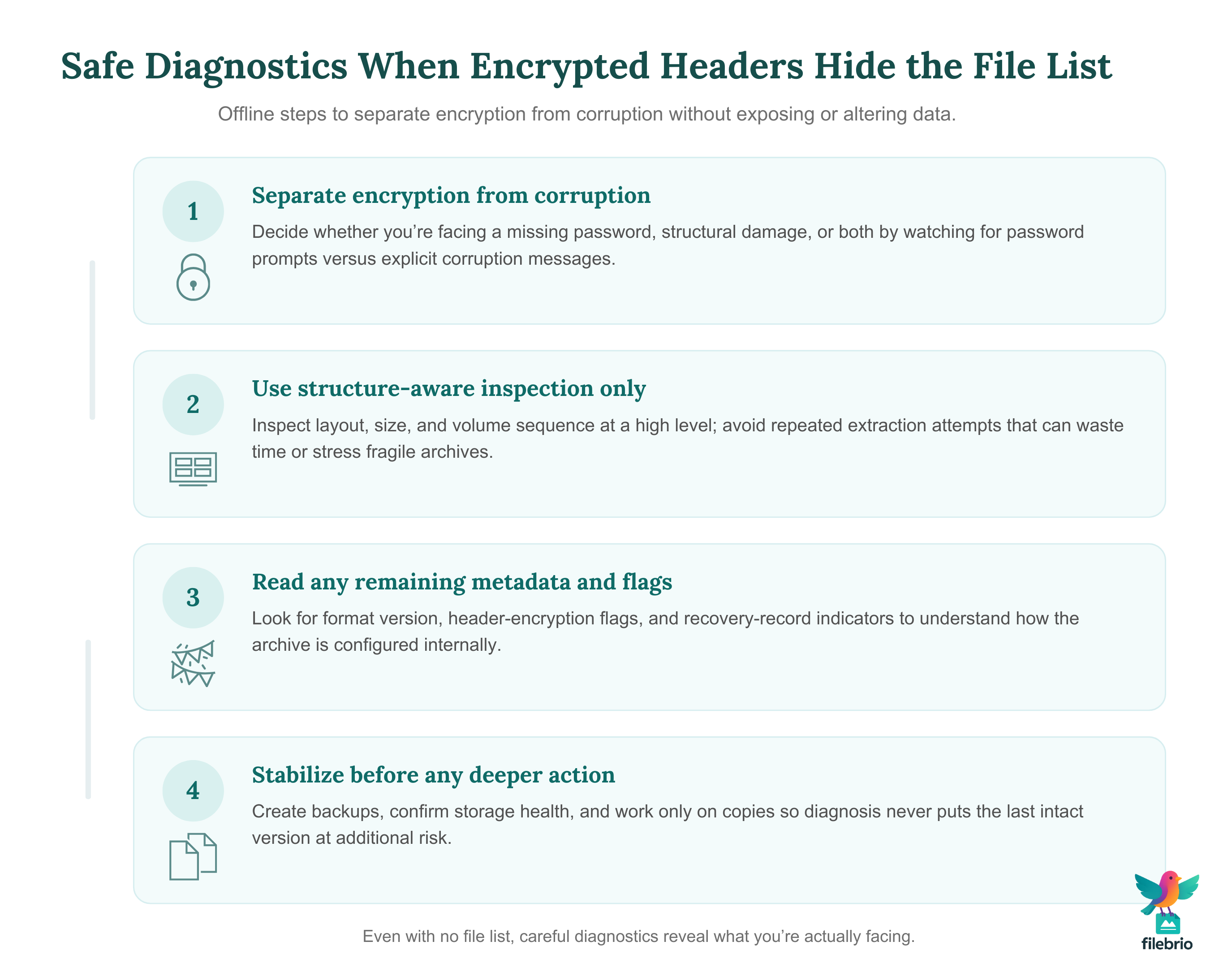
Before you consider any form of password attempt, it’s essential to diagnose what’s actually wrong with the SFX archive. The process below avoids sensitive commands and focuses on high-level checks you can perform safely.
1. Confirm that the file is truly an SFX archive
Some files distributed as “installers” are not RAR SFX packages at all but entirely different formats. A non-RAR executable will behave differently from a RAR-based SFX. You can often confirm the true structure by loading the file into a diagnostic tool that reads internal metadata rather than executing it directly.
2. Observe the exact error messages and sequence
Take note of:
- Whether you see a password prompt before any error appears.
- Whether the SFX shows a file list or jumps directly to extraction.
- Whether some files are written before failure, or nothing is extracted at all.
Compare these observations with the guidance in how to decode alerts shown by your WinRAR archive ↗️ to distinguish incorrect passwords from truncated or corrupted data.
3. Check environment and access rights
Administrative rights, antivirus software, and path permissions can all interfere with extraction. An SFX file that fails on one workstation might succeed on another with a less restrictive environment, even when the password is the same.
4. Inspect metadata without full extraction
When possible, prefer tools that read the internal archive structure without actually unpacking files. This helps you:
- Verify whether filenames are visible or protected.
- Check basic integrity markers and archive size consistency.
- Identify whether the SFX is based on a multi-volume set or a single archive.
High-level metadata analysis, as outlined in how to read metadata clues in your RAR file ↗️, can help you avoid destructive actions while still learning what went wrong.
🔐 Safe, Legal Options for Accessing Your Own SFX Archives
Once you understand whether you are facing a password issue, a format limitation, or damage, you can start mapping safe options. The key is to operate within clear legal and ethical boundaries and to avoid exposing sensitive SFX contents unnecessarily.
1. Work only with archives you own or administer
You should verify that you have the right to access the SFX archive — for example, you created it, your organization owns it, or you have documented authorization. Guidance from ethical ways to handle your encrypted RAR files ↗️ is directly applicable to SFX installers as well.
2. Use offline tools wherever possible
Online upload-and-unlock services often ask you to send the entire SFX file to a remote server. For sensitive business archives or personal data, this creates a significant privacy risk. Principles described in why offline tools keep your encrypted RAR data private ↗️ explain why local workflows are safer for SFX scenarios.
3. Focus on feasibility, not just effort
Even legitimate owners are limited by math and format design. If the SFX archive uses strong encryption, long random passwords, and encrypted headers, there may be no practical way to access it without the correct password, regardless of hardware or tools.
4. Document your actions
In corporate environments, recording what steps you attempted, which tools you used, and what evidence of ownership you collected can be important for audits or internal compliance reviews.
🛡️ Secure Offline Solution for Sensitive SFX Archives
Many SFX installers protect highly confidential material: internal tools, customer data bundles, or long-term backups. In these cases, “trying random tools from the internet” is rarely acceptable. You need a controlled, auditable environment that respects encryption limits while still giving you practical diagnostics.
FileBrio RAR Master fits into this privacy-first approach by concentrating recovery and diagnostics on your own workstation:
- Offline-only inspection. Encrypted SFX archives are never uploaded; all analysis happens locally inside your security perimeter.
- Format-aware diagnostics. The toolkit is designed around RAR/WinRAR specifics, including SFX, header flags, and typical error scenarios.
- Enterprise-friendly workflows. Clear separation between analysis, recovery attempts, and reporting makes it easier to align with internal policies.
When you need to evaluate whether it’s even worth trying to regain access, a structured environment is safer than mixing lightweight viewers and ad-supported tools. For an overview of capabilities, you can explore what FileBrio RAR Master can do ↗️, and when you are ready to deploy, obtain the installer directly from the official FileBrio downloads page ↗️.
________________________
FileBrio RAR Master — a secure, offline Windows toolkit for regaining access to your own password-protected RAR / WinRAR archives while keeping all data strictly on your device.
- Offline-only processing — never uploads your archives.
- Smart issue detection — password vs corruption.
- Fast recovery workflow optimized for legitimate ownership.
⬇️ Download FileBrio RAR Master
Reminder: FileBrio RAR Master is intended only for archives you own or are explicitly authorized to access. All operations run locally on your PC.
________________________
🛠️ Protection Tips for Future SFX Use
Even if a current SFX archive is difficult or impossible to open, you can still use the experience to redesign your future processes. The goal is to preserve strong protection while avoiding unnecessary lockouts and confusion.
1. Prefer standard archives for storage, SFX for distribution
For long-term storage, a non-executable RAR archive is often easier to inventory, monitor, and back up. SFX installers are best treated as distribution wrappers for specific scenarios (for example, sending a one-time package to a team that cannot install WinRAR). Using both formats strategically reduces complexity.
2. Keep documentation of passwords and archive structure
Store password hints and archive notes securely so that future you — or future colleagues — can understand what is inside without running the installer blindly. Practices similar to those described in how to organize metadata for your RAR passwords safely ↗️ also apply here.
3. Test SFX behavior on multiple systems
Before distributing an important SFX installer widely, test on clean environments:
- Standard user vs. administrator accounts.
- Different Windows versions and locales.
- Machines with stricter antivirus or application control policies.
This helps catch environment-specific failures early, while you still know the password and can easily rebuild the package if needed.
4. Avoid over-customized SFX messages that hide the truth
Highly customized text may be user-friendly while you remember the configuration, but it can become confusing years later. Keeping error and password prompts close to standard wording makes it easier for future admins to interpret what is going on.
5. Plan migration for very old archives
If you rely on older SFX packages created with legacy formats, plan to migrate them to more modern RAR5 archives or updated SFX modules while you still have working passwords. Background on format evolution and security implications is available in resources like how RAR5 improves protection of your encrypted files ↗️.
📜 Legal Reminder for Working With Encrypted SFX Files
Encrypted SFX installers can look like ordinary software installers, but from a compliance perspective they are still containers for sensitive data. That means your actions are subject to the same legal and ethical rules that apply to any password-protected archive.
- Confirm ownership and authorization. You should be able to show that you are working with your own data or with data you are explicitly responsible for.
- Record your steps. In regulated industries, keeping a clear record of diagnostics, tools used, and outcomes can be crucial during audits.
- Respect organizational policies. Many companies have strict rules about where encrypted archives may be stored, how they can be handled, and which tools are permitted.
- Know when to escalate. If an SFX archive contains high-impact information (for example, regulated personal data), it may be appropriate to involve legal or compliance teams before attempting any recovery efforts.
For official information on responsible use, licensing, and support, you can consult the dedicated FileBrio page for legal and responsible use policy ↗️, which explains boundaries and contact options for compliant workflows.
This article is provided for general informational and educational purposes only. Any examples, scenarios, or references to password recovery, archive security, or related tools (including FileBrio RAR Master or similar software) are intended solely to help you better understand how to protect and manage your own data.
You may only apply any techniques, workflows, or tools described here to files and archives that you fully own or are explicitly and verifiably authorized to access. Attempting to bypass, remove, or recover passwords for third-party data without clear permission may violate criminal law, civil law, or internal company policies in your jurisdiction.
Nothing in this article constitutes legal advice. Laws and regulations differ between countries and organizations, and you are solely responsible for ensuring that your actions comply with all applicable legislation, contracts, and internal policies. If you are unsure whether a particular action is lawful or permitted, consult a qualified legal professional before proceeding.
🔗 See Also: Learn More About RAR Security
- Understanding Multi-Volume RAR Archives: Password Behavior and Repair Options ↗️
- How File-Type Structure Affects RAR Diagnostics and Feasibility Analysis ↗️
- What RAR5 Quick Open Records and Recovery Blocks Do (High-Level Guide) ↗️
- RAR/WinRAR File Passwords Explained: How Encrypted Archives Work and What Access Options You Have ↗️