
How Naming Conventions and Everyday Habits Reveal Useful Clues About Your Archive Security
Many people assume that once a RAR password is forgotten, all helpful clues vanish. In reality, your digital habits — how you name files, organize folders, label projects, and structure workflows — form consistent behavioral patterns. These patterns don’t reveal the password and cannot be used for guessing, but they reflect the mindset you likely had when creating it.
Most users underestimate how stable their naming and organizing habits are. If you often rely on dates, themes, project tags, or structured labels, similar influences may have shaped your password choices. Remembering the situation in which the archive was created — a deadline, a long-term project, or something sensitive — can trigger the context needed to recall your approach.
By examining these personal and organizational cues, without attempting any password operations, you gain safe, high-level insight into what might have guided your thinking. This article explores these patterns and offers simple reflection techniques that stay fully aligned with responsible encryption practices.
🧭 Navigation
🧩 Introduction
Your naming habits tell a silent but meaningful story about how you organize information. These patterns reflect how you think, how you categorize tasks, and how you manage files during stressful or important moments. When you created the RAR archive in question, these behaviors were already ingrained—and likely influenced your password creation mindset.
Understanding your naming conventions therefore becomes a valuable reflection tool. It doesn’t reveal the password itself. Instead, it helps you reconstruct the motivation, the logic, and the style behind your decision. This high-level insight provides clarity when evaluating safe options for recovering access to your legitimately owned archive—complementing resources like ways to regain access to your locked RAR file ↗️.
Naming patterns often align with how people approach security. For instance, if you consistently version files (e.g., “Report_v1”, “Report_v2”), you might also use structured or increment-based logic when forming secure items. If you label things with themes (“Apollo_Project”), your passwords may follow conceptual associations. These reflective cues help you understand your decision-making without ever interacting with the underlying cryptography.
🧠 Why Naming Conventions Matter
Naming conventions are more than organizational habits—they’re windows into your cognitive patterns. They provide insight into how you cluster information, how you remember sequences, and what mental shortcuts you tend to use in digital environments. These tendencies do not vanish when you create a password; they merely appear in a different form.
The value of examining naming conventions lies in how they reveal:
- Your preferred style of structure — systematic, thematic, spontaneous, or minimalist.
- Your level of cognitive load at the time the archive was created.
- Your memory anchors — concepts, words, dates, or sequences.
- The importance you assigned to the archive, reflected in how you labeled related files.
For example, someone who uses highly modular names such as “Project_Alpha_Part3” often relies on structured thinking. In contrast, someone who uses simple names like “pics2” may lean toward minimalism or convenience. Neither approach is better or worse—they simply reveal different styles of reasoning.
Understanding this psychological layer becomes extremely helpful when reviewing options like ways to tell if your RAR file is corrupted or locked ↗️ or how to diagnose your unopened RAR file issue ↗️. Naming conventions provide a safe layer of context that supports these evaluations.
📁 How Everyday File-Naming Habits Influence Password Style
File-naming habits are one of the most stable behavioral markers in digital life. People repeat the same structures for years without realizing it. These patterns often carry into moments when they create passwords—not in content, but in structure.
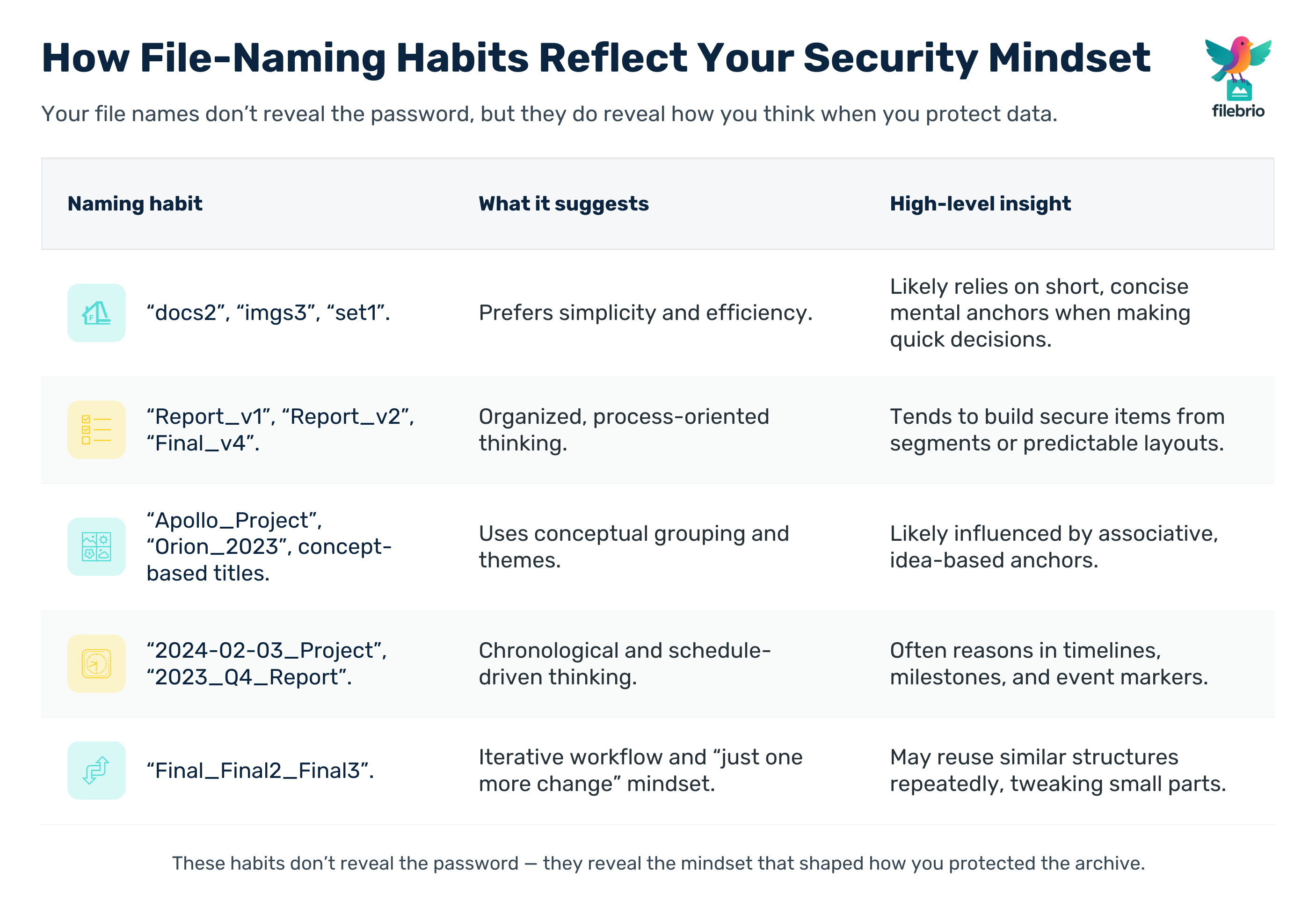
Below is an expanded table showing how common file-naming patterns correlate with high-level thinking styles that often influence password-creation logic:
| Naming Habit | Example Behaviors | What It Suggests | High-Level Insight Into Password Style |
|---|---|---|---|
| Minimalist | “docs2”, “imgs3”, “set1” | Prefers simplicity | May use concise mental structures |
| Structured + Versioned | “Report_v1”, “Final_v4” | Organized, process-oriented | Likely uses structured segments in secure items |
| Thematic | “Apollo_Project”, “Orion_2023” | Applies conceptual grouping | Concept anchors possibly influenced thought processes |
| Date-Based | “2024-02-03_Project” | Chronological thinker | Time or event-driven mental anchors |
| Redundant | “Final_Final2_Final3” | Iterative workflow | May prefer predictable repetitive structures |
| Hierarchical | “01_Overview”, “02_Notes”, “03_Results” | Sequence-oriented | May rely on ordered mental steps |
Again, none of this reveals the password itself. It simply helps you understand your mental environment at the moment of creation, much like ways to evaluate structural health of your RAR file ↗️ help you understand whether recovery is technically feasible.
🧠 Before You Overthink the Password — Understand the Pattern Behind It
When a protected RAR archive suddenly feels unfamiliar, the first instinct is often panic — *“Did I really lose it?”*
But before you get lost in worst-case thoughts, it helps to look at something people never notice:
your own naming habits already reveal the mental framework you were using that day.
These small behavioral fingerprints are incredibly stable:
- The way you label folders and files (structured, thematic, minimalistic)
- How you track versions and milestones
- Whether you lean toward order, spontaneity, or conceptual cues
- The workload and mood you were in when the archive was created
| What You Usually Experience | What This Reflection Helps You Understand |
|---|---|
| “I don’t remember anything about the password itself.” | Your naming patterns reveal the mindset you were in — structure, theme, workflow. |
| “Everything feels random now.” | Your folders still show consistency, even when memory feels fuzzy. |
| “I’m not sure what influenced my decisions that day.” | You can retrace high-level context without touching the password or archive contents. |
________________________
FileBrio RAR Master — part of the FileBrio Office Suite — is a privacy-first, offline Windows toolkit for diagnosing and safely regaining access to your own password-protected RAR / WinRAR archives.
- Local processing only — nothing leaves your PC.
- Smart diagnostics to separate password issues from corruption.
- Owner-verified recovery workflows designed strictly for legitimate use.
Reminder: FileBrio RAR Master may be used only with archives you own or are explicitly authorized to access. It performs all analysis and recovery operations locally on your device, without uploading data anywhere.
________________________
🧩 The Cognitive Side: How Mindset Shapes Naming and Password Choices
Every password is born from a moment—an emotional, cognitive, or situational condition that heavily influences how you label, categorize, or protect information. Decision context contributes far more than we realize.
Here are some high-level psychological influences that impact naming and password creation alike:
- Time pressure often leads to shorter structures and familiar mental shortcuts.
- Focused, meticulous work leads to longer, structured, thematic naming and secure-item creation.
- Stress or urgency can push toward easy, quick patterns.
- Creative mood may encourage thematic or conceptual styles.
- Corporate or teamwork context leads to structured, policy-driven choices.
These influences do not break encryption or expose sensitive data—they simply help you understand why you made certain decisions. This context-driven reflection is also helpful when reviewing why RAR archives become susceptible to corruption ↗️ or why certain archives were treated differently than others.
⏳ How Timing, Workload, and Environment Influence Password Style
When the archive was created affects how you thought about it. This includes:
- Workload intensity — during busy cycles, people default to fast, familiar choices.
- Project importance — higher importance often leads to more structured decisions.
- Location — work devices vs. personal devices influence conventions.
- Collaboration level — team projects encourage standardized naming.
Understanding the broader timeline provides valuable insight into why you protected the archive, which complements investigations like how to narrow down causes of your locked RAR file ↗️.
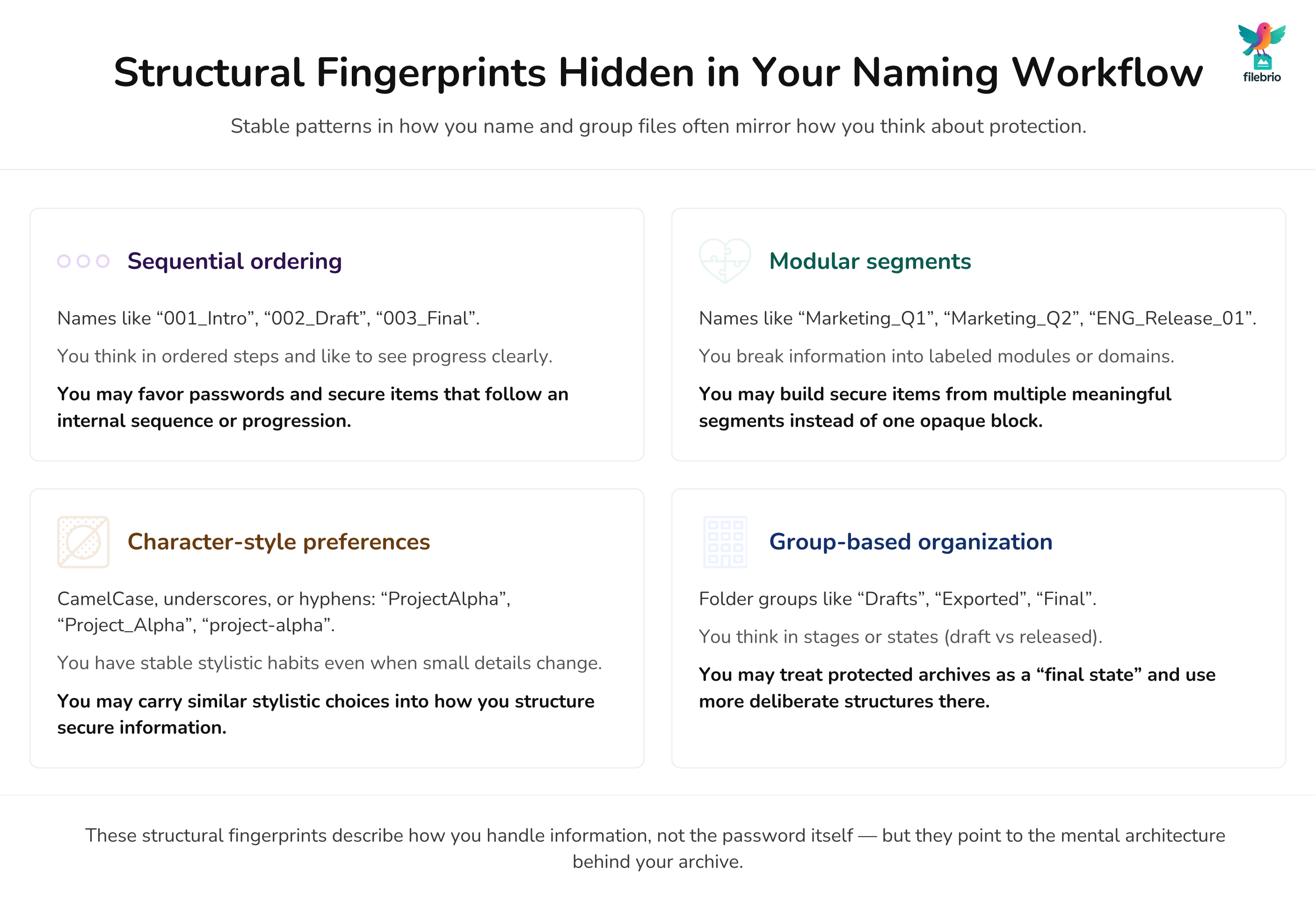
🔠 Structural Patterns Hidden in Your Naming Workflow
Naming workflows often reveal structural fingerprints. These fingerprints are consistent across decades of digital work, which makes them extremely useful for safe reflection.
Examples of structural clues:
- Sequential ordering (e.g., 001, 002, 003).
- Modular segments (e.g., Marketing_Q1, Marketing_Q2).
- Character-style preferences (CamelCase, underscores, hyphens).
- Group-based organization (“Drafts”, “Exported”, “Final”).
These habits often mirror the way you structure secure items, too, because both derive from your cognitive architecture.
📊 Extended Table of Common Naming Patterns
This extended table provides more categories and broader insights:
| Category | Naming Behavior | Underlying Tendency | High-Level Security Insight |
|---|---|---|---|
| Organized | Versioning, segmented labels | Systematic reasoning | Structured mental logic |
| Spontaneous | Quick labels, informal names | Fast decision-making | Preference for intuitive choices |
| Minimalist | Short names, very concise labels | Efficiency mindset | Likely short mental anchors |
| Thematic | Project named after concepts | Creative thinking | Associative semantic patterns |
| Calendar-driven | Date or year in names | Chronological categorization | Potential time-based reasoning |
| Repetitive | “final_final3_final4” | Iterative workflow | Repetitive structural logic |
🏢 Corporate Naming Culture and Its Impact on Password Decisions
Corporate environments shape naming conventions differently from personal ones. Employees often follow strict labeling rules: project prefixes, department tags, version numbers, compliance codes, or chronological ordering. These norms create a predictable digital ecosystem—and people mirror these norms when creating secure items as well.
Examples of corporate influence include:
- Project identifiers (PRJ-2024-47).
- Department tags (HR_Forms, ENG_Specs).
- Client references.
- Version sequencing that aligns with internal workflow.
Because enterprise workflows emphasize structure, employees often adopt structured methods when creating protected archives as well. Understanding this helps greatly when verifying archive recoverability or evaluating issues such as distinguishing password issues from corruption ↗️.
🔍 Turn Naming Clues Into High-Level Structure — Without Touching the Password
Once you recognize your naming tendencies, the next step is understanding how they shape *structure*, not content.
This is where people often have a breakthrough: you don’t need to remember the password — just the mental architecture you were using at the time.
A quick structural check can show whether you were in:
- “Organized mode” — using segments, versions, or sequences
- “Theme mode” — applying conceptual labels across files
- “Deadline mode” — fast, efficient naming under pressure
- “Habit mode” — repeating familiar formats automatically
| If You Don’t Reflect | If You Use Naming-Based Insight |
|---|---|
| You misjudge the situation and assume the worst. | You see the archive through the same structure you used when creating it. |
| You feel stuck because memory feels blank. | You reconnect with the logic behind your choices, even if details faded. |
| You waste time trying random avenues. | You get a clear, calm framework before touching anything. |
________________________
FileBrio RAR Master — a secure, offline Windows toolkit for regaining access to your own password-protected RAR / WinRAR archives while keeping all data strictly on your device.
- Offline-only processing — never uploads your archives.
- Smart issue detection — password vs corruption.
- Fast recovery workflow optimized for legitimate ownership.
⬇️ Download FileBrio RAR Master
Reminder: FileBrio RAR Master is intended only for archives you own or are explicitly authorized to access. All operations run locally on your PC.
________________________
🔗 Linking Naming Conventions to High-Level Password Structure
This section does not teach how to guess passwords. Instead, it shows how naming habits indirectly reflect the mental model behind the password’s creation. This model can help you reflect on why you created the archive the way you did.
| Naming Pattern | Password Insight |
|---|---|
| Structured versioning | May prefer consistent segments or predictable layouts |
| Date and timeline-based names | Likely influenced by time-based categorization |
| Thematic labels | May rely on conceptual anchors |
| Minimalist naming | May reflect concise, efficiency-driven thought patterns |
| Sequential numbering | May reflect preference for orderly progression |
📝 Realistic, Non-Sensitive Case Scenarios
Let’s walk through several completely hypothetical but realistic scenarios that illustrate how naming habits shape security reasoning:
Case 1: The Version-Oriented Analyst
This person labels files “Budget_v1”, “Budget_v2”, “Budget_v3”. When they created their archive, they were working on a quarterly financial report. Their structured approach suggests a methodical mindset, which often influences how they secure materials in a consistent environment.
Case 2: The Creative Project Lead
Their files are named after mythological figures. The archive they protected was part of a brainstorming cycle. Their thematic framework indicates conceptual thinking—useful when understanding what prompted the protection.
Case 3: The Minimalist IT Technician
They label files “set2”, “set3”, “backup4”. Their archive likely belonged to a routine task. The password style may reflect this efficiency-driven environment.
Case 4: The Deadline-Focused Operations Manager
Their files include “urgent_final”, “export_final3”, “final_final”. The archive was created during a stressful deadline. Time pressure likely shaped how the secure-item decision was made.
🛡️ Safe Reflection Techniques (No Guessing)
The techniques below are safe, high-level methods to understand your own decision-making—not to derive or guess the password:
- Review nearby files in the same folder; they reflect your workflow.
- Check timestamps—busy days often influence mental shortcuts.
- Observe naming patterns in related projects.
- Recall tools or devices used—different tools shape behavior.
- Think about the archive’s purpose—high-importance tasks influence structure.
This reflective process complements broader recovery evaluations similar to how to detect early signs in your faulty RAR file ↗️.
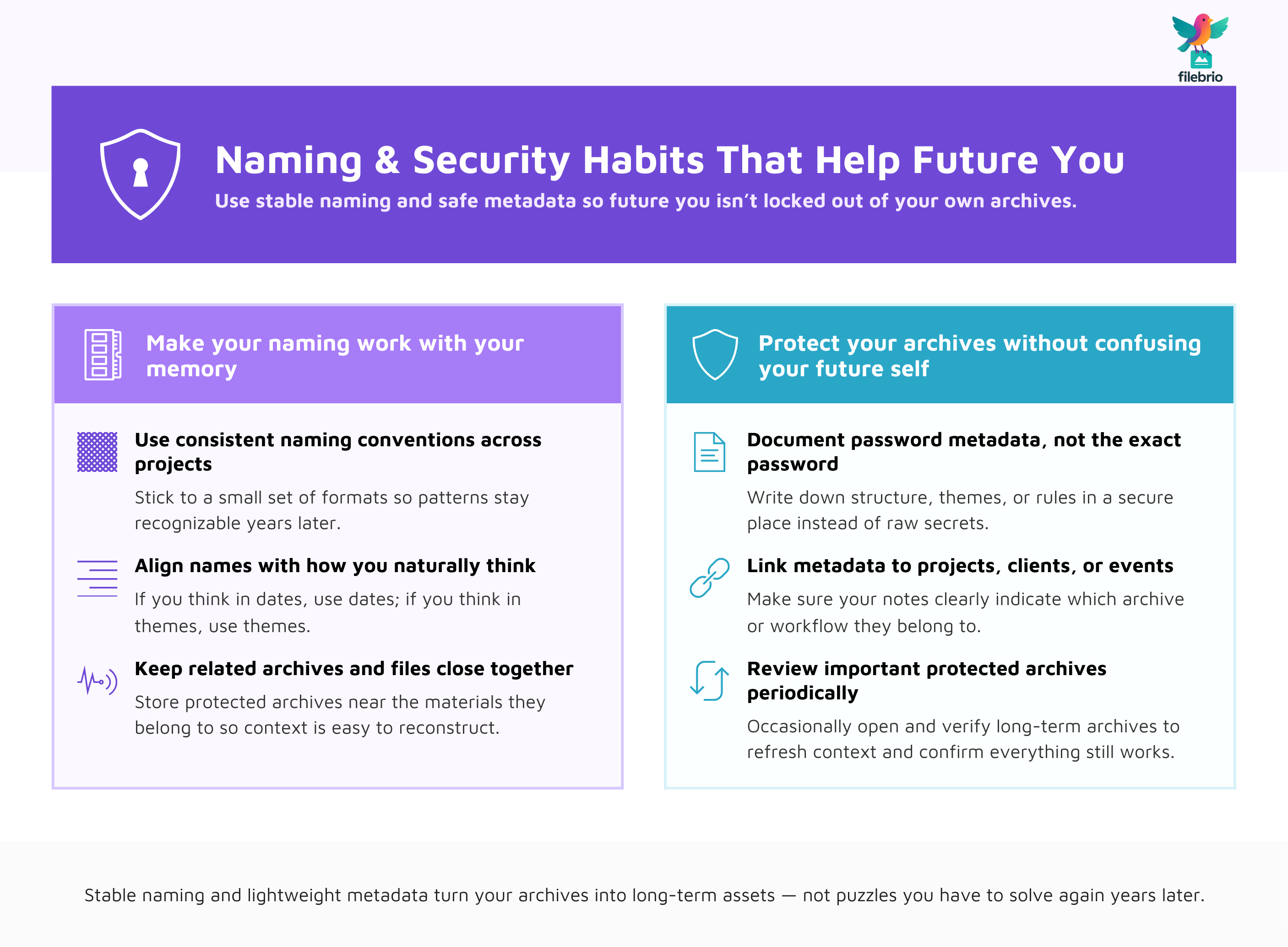
🔐 How to Build Naming and Security Habits That Help Future You
Improving your naming habits today can significantly reduce confusion tomorrow. These strategies strengthen both memory and archive hygiene:
- Use consistent naming conventions that support memory.
- Document password metadata safely for future reference.
- Keep structured notes stored in secure offline mediums.
- Align naming with your natural cognitive style.
These practices make future archival decisions more transparent and reduce uncertainty.
📘 Summary
Naming conventions and everyday habits hold surprisingly rich insight into how you approached the creation of your RAR archive. They reveal cognitive tendencies, organizational patterns, and workflow decisions that influenced your mindset. By studying these habits—and combining them with privacy-first tools—you can approach your protected archive responsibly, thoughtfully, and with clearer understanding.
⚖️ Legal Reminder
This article is provided for general informational and educational purposes only. Any examples, scenarios, or references to password recovery, archive security, or related tools (including FileBrio RAR Master or similar software) are intended solely to help you better understand how to protect and manage your own data.
You may only apply any techniques, workflows, or tools described here to files and archives that you fully own or are explicitly and verifiably authorized to access. Attempting to bypass, remove, or recover passwords for third-party data without clear permission may violate criminal law, civil law, or internal company policies in your jurisdiction.
Nothing in this article constitutes legal advice. Laws and regulations differ between countries and organizations, and you are solely responsible for ensuring that your actions comply with all applicable legislation, contracts, and internal policies. If you are unsure whether a particular action is lawful or permitted, consult a qualified legal professional before proceeding.
📚 See Also
- Forgot Your RAR Password? Practical Ways to Regain Access to Your Own Archive ↗️
- What to Do When You Can’t Open Your Own RAR File ↗️
- How to Identify the Real Reason a RAR Archive Won’t Open ↗️
- How to Confirm Whether Your RAR Archive Is Still Technically Recoverable ↗️
- Why RAR Archives Become Corrupted: Common Causes and How to Prevent Them ↗️
- How Naming Conventions and Everyday Habits Reveal Useful Clues About Your Archive Security ↗️