
Ethical Use of Publicly Available Information When Designing Security Policies
Security teams constantly see search terms like “open RAR file online” or “unlock archive without password” and feel pressure to react. Publicly available information looks tempting: social media posts, forum messages, job profiles, even leaked password dumps. But where is the ethical line between interpreting open signals to improve policy and tracking individuals in ways that violate privacy or compliance rules? This article walks you through how to design security policies that responsibly use public information while protecting employees, customers, and your own long-term reputation.
🧭 Navigation
Important
The information provided in this article applies exclusively to RAR / WinRAR archives for which you have full, demonstrable ownership or properly documented authorization. If you are not the rightful owner of the data, do not directly control it, or cannot clearly prove permission to access it, you must stop immediately. Attempting to access, recover, or modify data without explicit authorization may violate criminal law, civil statutes, corporate compliance requirements, and privacy regulations in many jurisdictions. You alone are responsible for ensuring that your actions are lawful and properly permitted before proceeding.
📌 TL;DR — Ethical Use of Public Information
Organizations often rely on publicly available information (job posts, social media, data breaches reported in the news, industry reports) to shape security policies. Done well, this helps you design better password rules, communication guidelines, and RAR/archive handling procedures. Done poorly, it can turn into quiet surveillance of employees or customers, create legal exposure, and undermine trust.
An ethical approach focuses on aggregated patterns, not individuals. Security teams should look at trends: which password habits are common, how often users reuse credentials, where they typically store RAR passwords, and how online tools are advertised. You can then turn these insights into policies, awareness training, and technical controls — for example, promoting offline recovery tools, discouraging untrusted online unlockers, and enforcing clear rules on storing password metadata.
However, publicly available information does not grant you the right to track specific people, profile them without consent, or combine data in ways that breach privacy law or internal codes of conduct. You must define boundaries, document legitimate purposes, and ensure transparency. Use public data at a policy level (“we see these patterns in the world, so let’s update our standards”), not a monitoring level (“we saw this person search for X, so they are suspicious”). Ethical use turns open information into better protection for everyone — not into a tool for overreach.
🧠 Why Publicly Available Information Matters for Security Design
Public information is a mirror of real behavior. When you look at how people talk about forgotten passwords, upload encrypted RAR archives to random websites, or ask for “instant unlocks,” you can understand the gaps in security awareness and design policies that address them. This is especially relevant for archives that hold sensitive data — legal documents, finance exports, HR records — and are protected by RAR or WinRAR encryption.
At a conceptual level, public data helps you:
- Identify common misunderstandings — for example, believing that password resets work for encrypted archives.
- Spot emerging risks, such as employees trusting “free online unlockers” for corporate RAR files.
- Understand industry-wide patterns around password reuse, weak passphrases, or unsafe storage locations.
Before designing policies around this, your teams should already understand ethical ways to handle your encrypted RAR files ↗️. This ensures that any use of public information feeds into responsible handling of archives, rather than encouraging risky shortcuts or intrusive monitoring of individuals.
Used properly, public information is not about spying on what specific people do online, but about refining your security posture: adjusting password length requirements, defining how RAR archives are shared, and clarifying whether online tools are acceptable in corporate environments (often, they are not).
🔍 Types of Public Data and Hidden Sensitivities
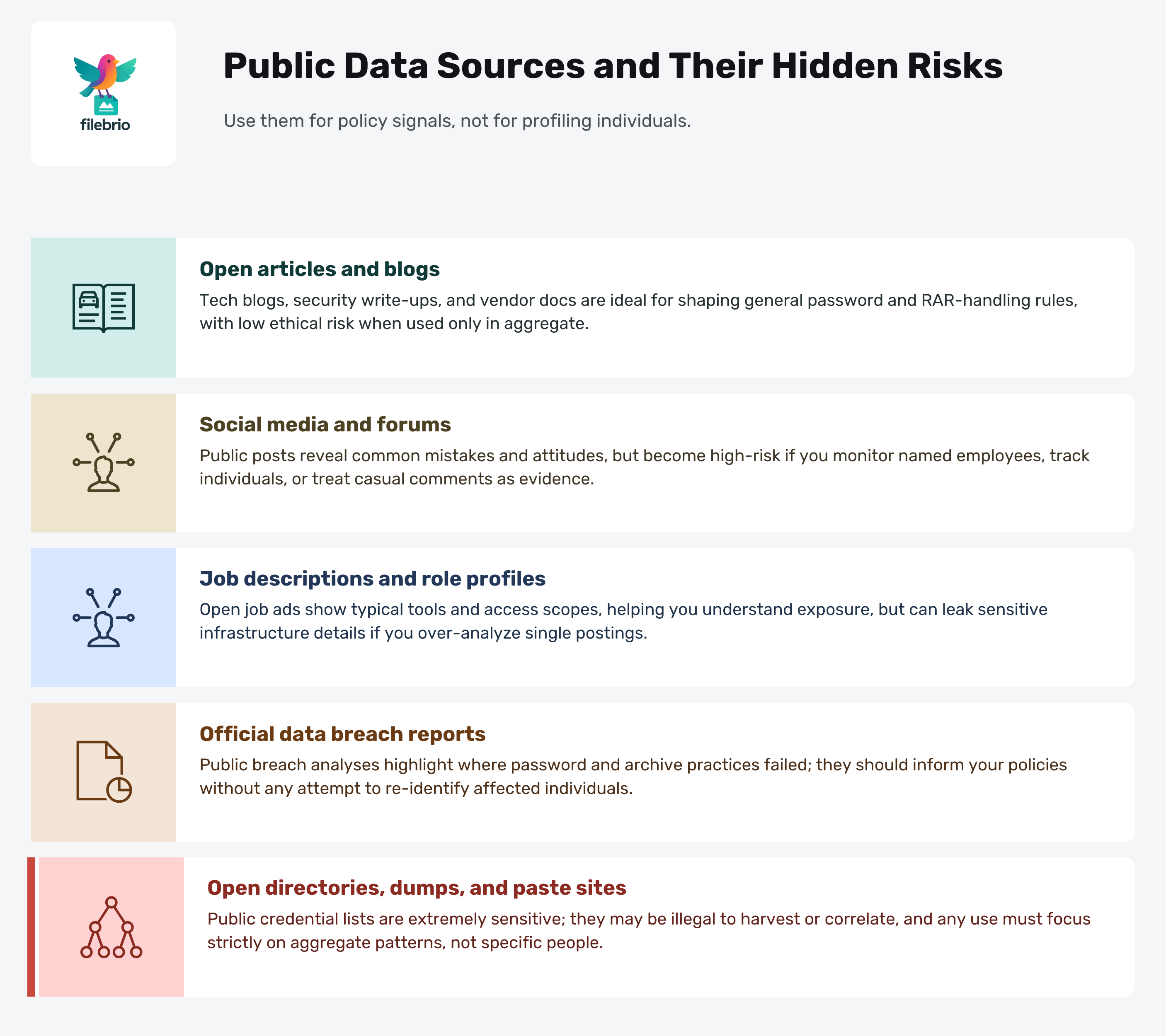
“Publicly available” does not mean “free to use without limits.” Different sources carry different expectations and hidden sensitivities. Security policies should recognize these nuances instead of treating all public data as equivalent.
| Source Type | Examples | Typical Policy Use | Risks / Sensitivities |
|---|---|---|---|
| Open Articles & Blogs | Tech blogs, security write-ups, vendor docs | Inform password policy, RAR handling standards | Low risk if used in aggregate, not to target individuals |
| Social Media Posts | Public tweets, open LinkedIn posts, forum threads | Understand common mistakes and attitudes | High risk if monitoring named users or employees |
| Job Descriptions | Role profiles listing tools, access scopes | Discover what tech stack and exposure is typical | Can reveal sensitive infrastructure if over-detailed |
| Data Breach Reports | Official disclosures, industry analyses | Learn where password practices failed | Must avoid re-identifying individuals or victims |
| Open Directories & Paste Sites | Public dumps, credential lists, search indexes | Learn patterns of leaked passwords in aggregate | Extremely sensitive; high legal and ethical risk |
When public discussions show that users often store their RAR passwords in plain text, or routinely upload archives to untrusted websites, you can safely incorporate this into internal guidelines about what not to do. At the same time, you should build positive patterns: for example, encouraging teams to store metadata safely, as described in how to organize metadata for your RAR passwords safely ↗️ and how teams can organize shared RAR password metadata ↗️.
🏛️ Ethics, Law, and Corporate Responsibility
Ethical use of public data starts with a simple principle: having access does not mean you have permission. Just because something is indexable by a search engine does not automatically make it fair game for profiling employees, customers, or partners.
In many jurisdictions, privacy and data protection laws still apply when public information can be linked back to an identifiable person. Your security policies should be grounded in documented legal factors when accessing your encrypted RAR files ↗️, even if you are “only” working with publicly visible signals. Questions to address include:
- What legitimate interest justifies using a given category of public data?
- At what point does aggregating and correlating information turn into de-facto surveillance?
- Which approvals (legal, compliance, works council, DPO) are mandatory before starting such activities?
Ethical responsibility also extends to the tools you promote internally. If you require secure handling of password-protected archives, you should guide users towards why offline tools keep your encrypted RAR data private ↗️ and away from unvetted online services, even if those services are widely advertised in public search results.
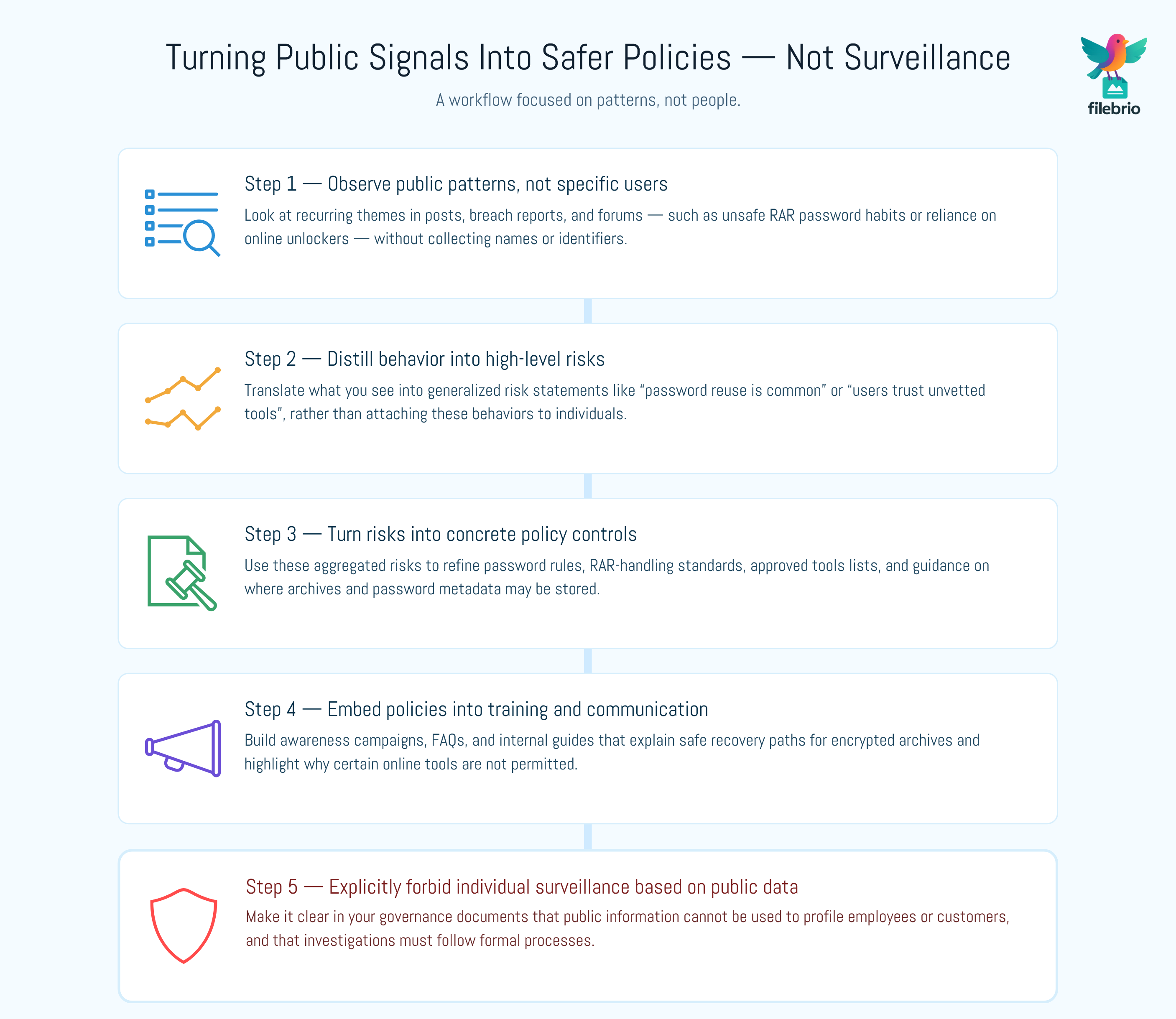
🧩 Turning Public Signals Into Safer Policies (Not Surveillance)
The most sustainable approach is to treat public information as input for policy design, not a basis for tracking individuals. For example, you may observe that many people publicly admit to reusing passwords across multiple accounts, or to storing RAR archive passwords in email drafts. From this, you can derive rules and training content without ever monitoring personal accounts.
Instead of trying to “catch” users making mistakes in real time, you can:
- Strengthen internal requirements, such as how to reinforce protection of your encrypted RAR files ↗️ while preserving future access.
- Define clear rules for where RAR archives may be stored (on which systems, under what conditions), aligned with ways to prevent losing your RAR data on storage devices ↗️.
- Establish guidelines on whether uploading archives to third-party sites is ever permitted.
Public signals should also inform your assessment of safe recovery options. For example, user confusion seen in open forums can guide you to publish internal FAQs based on how to assess safe access paths for your locked RAR file ↗️, reminding staff that only archives they own and control may be processed.
🧰 All-In-One Toolkit for Policy-Driven RAR Workflows
When you turn public information into better policy, people still need practical tools that follow those rules. Security guidelines are far more likely to be respected when the recommended software is easy to use, privacy-first, and matches what your policies say about offline processing and ownership checks.
This is where a dedicated toolkit like FileBrio RAR Master and the broader Office Suite can support your governance model. Instead of staff experimenting with random online utilities, you can standardize on one audited, offline solution that aligns with your expectations and documented procedures.
| Policy Requirement | Practical Need | How a Managed Toolkit Helps |
|---|---|---|
| Keep encrypted archives local | Process RAR files without uploads | Use an offline suite that never sends archives to the cloud |
| Prove legitimate ownership | Document who owns the archive | Support workflows built around how to verify ownership before accessing your RAR file ↗️ |
| Preserve future access | Store hints and metadata safely | Follow guidance on how to preserve password metadata for your encrypted RAR files ↗️ |
To help teams adopt a consistent, policy-aligned toolset, you can highlight FileBrio RAR Master features ↗️ in your internal standards and direct users to offline vs online RAR recovery ↗️ comparisons. When you are ready to roll out software centrally, you can get the FileBrio Office Suite installer ↗️ from the official download page, ensuring everyone works with the same trusted build.
________________________
FileBrio RAR Master — part of the FileBrio Office Suite — is a privacy-first, offline Windows toolkit for diagnosing and safely regaining access to your own password-protected RAR / WinRAR archives.
- Local processing only — nothing leaves your PC.
- Smart diagnostics to separate password issues from corruption.
- Owner-verified recovery workflows designed strictly for legitimate use.
Reminder: FileBrio RAR Master may be used only with archives you own or are explicitly authorized to access. It performs all analysis and recovery operations locally on your device, without uploading data anywhere.
________________________
🧑🤝🧑 Minimizing Bias, Overreach, and Misuse
Publicly available information can quickly become a source of bias. For example, if security teams over-interpret social media behavior, they may label certain users as “high risk” based on incomplete or context-less posts. This is especially problematic where encrypted RAR archives hold performance data, HR documents, or financial records, and where any suspicion may have career implications.
Policies should clearly forbid:
- Using public posts as the sole basis for investigations or disciplinary action.
- Profiling individuals based on private assumptions about their technical skills or interests.
- Inferring that someone is mishandling archives because they read about recovery tools online.
Instead, security policies can point employees to trustworthy resources such as how to protect sensitive files while enabling authorized recovery ↗️, and remind them that internal help channels exist. When users feel safe asking for assistance, they are less likely to resort to unvetted tools or risky websites they find in public search results.
🔐 Secure Offline Solution for Sensitive Archives
Public information often pushes users toward fast, flashy, and risky options — “instant unlock online,” “no installation required,” and similar promises. Responsible security policy needs to steer people back toward tools that are documented, auditable, and offline. This is particularly important for password-protected RAR archives used to store confidential corporate data.
By pairing your policies with a standardized offline suite, you reduce the temptation to try whatever appears first in search results. A toolset that respects privacy and implements clear safeguards makes it easier to align everyday behavior with what your policies demand.
- Use offline tools that comply with your legal and responsible use policy ↗️.
- Rely on suites that help you design workflows consistent with how to design a secure workflow for your encrypted files ↗️.
- Provide guidance and training materials referencing app capabilities overview ↗️ so staff know what is officially supported.
From a governance perspective, it helps to centralize deployment and licensing through your procurement team, using documented license options and pricing ↗️. That way, the tools you approve are clearly separated from the online utilities that your policies restrict or forbid.
When you are ready to standardize on a single, policy-aligned toolkit, you can download FileBrio tools from the official suite page ↗️ and roll them out under your existing management and monitoring infrastructure.
________________________
FileBrio RAR Master — a secure, offline Windows toolkit for regaining access to your own password-protected RAR / WinRAR archives while keeping all data strictly on your device.
- Offline-only processing — never uploads your archives.
- Smart issue detection — password vs corruption.
- Fast recovery workflow optimized for legitimate ownership.
⬇️ Download FileBrio RAR Master
Reminder: FileBrio RAR Master is intended only for archives you own or are explicitly authorized to access. All operations run locally on your PC.
________________________
🧱 Policy Controls Around RAR and Encrypted Archives
Security policies informed by public information should be very explicit about what is acceptable when working with encrypted archives. Observing how people handle RAR files in the wider world allows you to anticipate where things typically go wrong and to block those paths in your environment.
Key topics to cover include:
- Ownership verification — require procedures aligned with how to document control of your sensitive encrypted files ↗️ before any recovery attempt starts.
- Permitted tools — list which offline utilities are approved, emphasizing that users must never rely on random online unlockers, even if they seem popular.
- Data location — specify storage locations and backup routines, drawing on how teams can preserve long-term access to encrypted RAR files ↗️ for enterprise archives.
- Metadata handling — codify safe practices for hint storage, aligned with how to design secure password rules for your business RAR files ↗️.
Policies should also remind users that there are legal ways to handle your protected RAR/WinRAR contents ↗️ when they run into issues, and that support channels exist precisely so they do not have to improvise using techniques they picked up from public forums or videos.
🧪 Governance, Training, and Audit Trails
Ethical use of public information must be supported by governance. That means you can show, at any time, why certain sources were used, what questions they answered, and how they influenced your written policies — especially where encrypted archives and password-protected RAR files are involved.
Practical steps include:
- Maintaining a register of public sources used to inform policy decisions.
- Documenting the internal discussions that led from observed patterns to written rules.
- Training staff using clearly written guides, such as RAR/WinRAR file passwords explained ↗️, so they understand why the policies exist.
Audit trails are not just for regulators. They help your own teams answer uncomfortable questions: Why are online unlockers forbidden? Why are certain RAR workflows mandatory? Why must we store hints but never full passwords? By grounding those rules in real-world patterns and well-documented justifications, you show that your policies are protective, not arbitrary.
When questions arise about specific recovery actions, your teams can refer to both your internal policy documents and external resources like how to ensure you’re recovering only RAR files you own ↗️. This combination of governance, documentation, and training keeps your use of public information within ethical boundaries.

⚖️ Legal Reminder
This article is provided for general informational and educational purposes only. Any examples, scenarios, or references to password recovery, archive security, or related tools (including FileBrio RAR Master or similar software) are intended solely to help you better understand how to protect and manage your own data.
You may only apply any techniques, workflows, or tools described here to files and archives that you fully own or are explicitly and verifiably authorized to access. Attempting to bypass, remove, or recover passwords for third-party data without clear permission may violate criminal law, civil law, or internal company policies in your jurisdiction.
Nothing in this article constitutes legal advice. Laws and regulations differ between countries and organizations, and you are solely responsible for ensuring that your actions comply with all applicable legislation, contracts, and internal policies. If you are unsure whether a particular action is lawful or permitted, consult a qualified legal professional before proceeding.
📚 See Also
- Legal And Ethical Guidelines For Working With Password-Protected Files ↗️
- Why Offline Recovery Tools Are Safer For Privacy ↗️
- How To Build A Safe Workflow For Working With Encrypted Archives ↗️
- How To Ensure You’re Recovering Only RAR Files You Own ↗️
- How To Protect Sensitive Files While Allowing Authorized Recovery (Corporate Workflows) ↗️
- FileBrio RAR Master: Support & Legal (Responsible Use) ↗️
- Legal Considerations When Working With Your Own Encrypted Archives ↗️