
Why Encrypted Headers Make Content Discovery Impossible — and What That Implies for Recovery
You open a RAR archive you know is important. Instead of a familiar list of filenames, your tool shows almost nothing — maybe just the archive itself, maybe a single placeholder, or a prompt for a password with no preview of what’s inside. It feels like you’re working blind: you suspect there are files in there, but you can’t even see their names.
This is exactly what happens when encrypted headers are enabled. The archive is designed to reveal nothing about its internal contents until the correct password is provided. That’s good for privacy — but it changes how diagnostics and recovery work, especially if you’ve forgotten the password or suspect corruption.
In this guide, we’ll unpack what encrypted headers actually do, why content discovery becomes impossible, and how that affects realistic recovery options for RAR archives you legitimately own. You’ll also see how to plan ahead so header encryption increases your privacy without turning your archives into permanent black boxes.
🧭 Navigation
⚡ TL;DR — Encrypted Headers, Visibility, and Recovery at a Glance
When a RAR archive uses encrypted headers, the archive’s directory information (filenames, paths, sizes, timestamps, and other metadata) is encrypted along with the data itself. Until the correct password is provided, the tool cannot show a real file list — you may see nothing useful at all. That’s excellent for privacy but makes diagnostics harder: you can’t inspect which files exist, how large they are, or where corruption starts. Recovery is still possible in some cases, but feasibility is harder to estimate, and guessing is riskier because you can’t rely on visible clues. The safest approach is to combine careful metadata checks, secure offline tools, and strong password hygiene so you keep both privacy and long-term access for archives you own.
🧠 What Are Encrypted RAR Headers?
Every RAR archive, encrypted or not, has headers — small structured chunks of information that tell the tool which files exist, how big they are, how they’re compressed, and where they’re stored inside the archive. Think of headers as the “table of contents” and “index” of your archive.
In a typical non-encrypted-header archive, these headers are at least partly readable without the password. You might not be able to open any files, but you can at least see filenames and sizes. From a diagnostic perspective, that’s extremely useful.
With encrypted headers, RAR takes this one step further. Instead of just encrypting file contents, it also encrypts the directory information itself. Without the correct password, the tool cannot interpret the header blocks; from the outside, the archive becomes an opaque blob of cipher text.
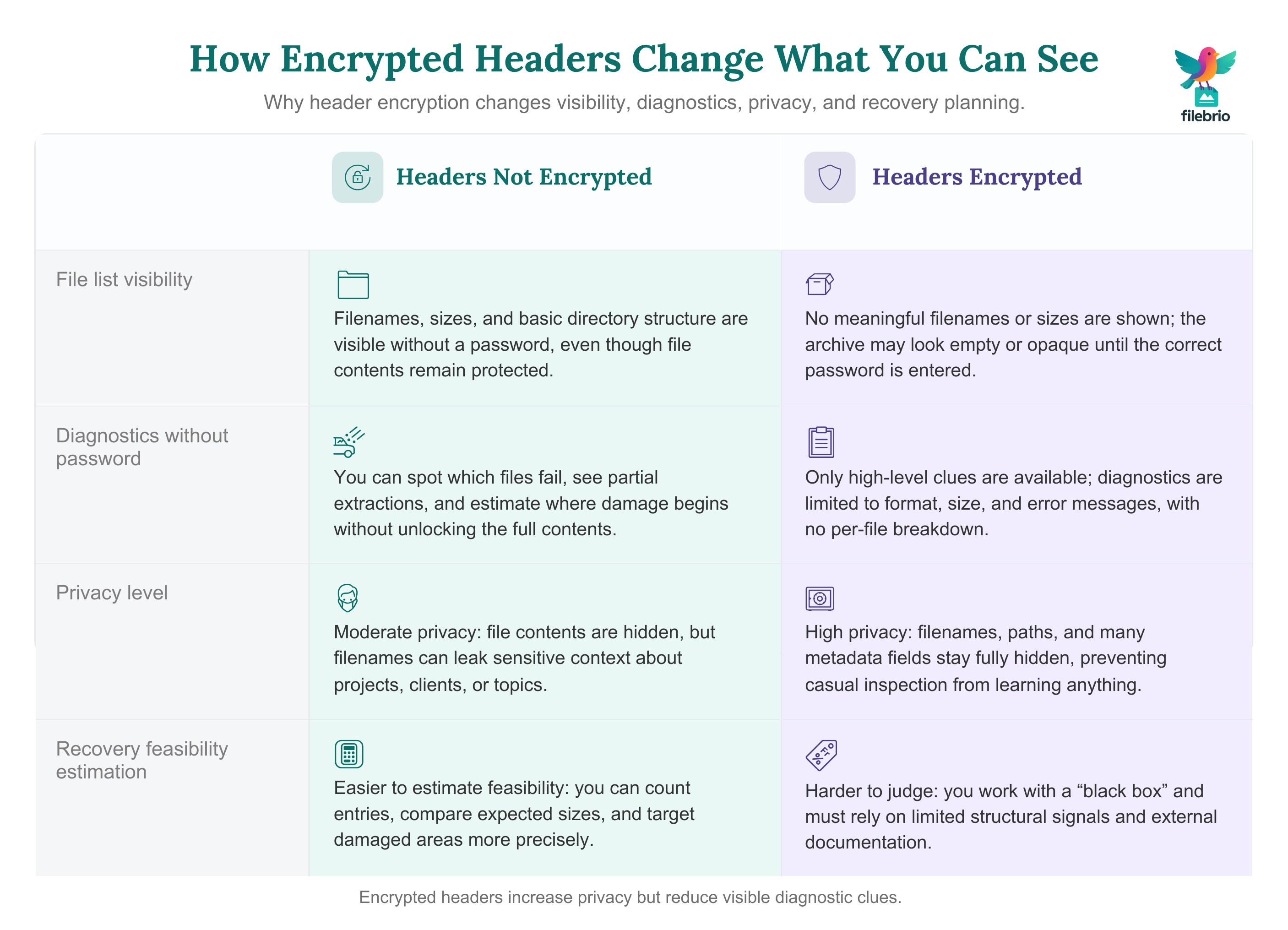
| Aspect | Headers Not Encrypted | Headers Encrypted |
|---|---|---|
| File list visibility | Filenames and sizes are visible. | No meaningful filenames or sizes visible. |
| Basic diagnostics without password | Possible (you can see which entries fail). | Very limited — archive looks like a black box. |
| Privacy against casual inspection | Moderate — names can leak context. | High — even file names remain hidden. |
| Recovery feasibility estimation | Easier — you can see number and size of files. | Harder — you lack structural clues. |
If you’ve never actively enabled this option, it’s worth learning simple ways to spot header encryption in your RAR file ↗️ so you know which of your archives are fully opaque and which still reveal basic directory information.
🔒 Why Encrypted Headers Hide Filenames and Structure Completely
Encrypted headers are designed to solve a specific privacy problem: even if file contents are secure, the list of filenames can leak a lot. A filename like Payroll-2023-Q4.xlsx reveals sensitive context long before you actually open it.
By encrypting the headers, RAR ensures that:
- The tool cannot safely parse filenames or paths without the correct key.
- Sizes, timestamps, and many metadata fields are also hidden or unusable.
- Even the number of files may not be obvious from outside inspection.
From a security-model perspective, this is a strong design choice. It aligns with modern encryption principles, where metadata is also treated as sensitive. For a broader view of how RAR4 and RAR5 handle your data, see how RAR4 and RAR5 secure your protected data ↗️, which explains how different formats balance usability and security.
“But My Tool Shows One ‘File’ Inside the Archive…”
Some tools, when they can’t interpret encrypted headers, may display a placeholder or a single pseudo-entry. This doesn’t mean that there’s only one real file — it just reflects the tool’s inability to decode the directory information without the password.
It’s crucial not to misinterpret such placeholders as proof that the archive is empty or nearly empty. In most cases, the content is still there — just hidden behind both encryption and an unreadable table of contents.
Why This Matters for Recovery
If you can’t see filenames, you also can’t see:
- Which files are critical vs. expendable.
- Whether some files extract cleanly while others fail.
- Which parts of the archive correspond to which parts of your data.
That absence of visibility makes it harder to reason about recovery feasibility. For example, you might normally use partial extractions to determine whether only the tail of an archive is damaged. With encrypted headers, that kind of fine-grained diagnostic becomes much more limited.
🧩 All-in-One Solution for Understanding Encrypted Headers
When a RAR archive shows no filenames, no structure, and behaves like a blank container, it can be hard to tell what’s actually going on. Is the file locked? Is it damaged? Or are the contents intentionally hidden because header encryption is enabled?
Instead of guessing, it helps to use a tool that can read the small set of structural signals that still remain visible, even when everything else inside the archive is intentionally concealed.
| What You Can’t See | What You Can Still Learn |
|---|---|
| Filenames | Whether header encryption is active |
| Folder structure | RAR format version (RAR4 vs RAR5) |
| Per-file metadata | Whether the archive looks complete or truncated |
FileBrio RAR Master brings these clues into one clear view. Fully offline, it helps you determine whether you’re dealing with:
- a healthy archive with encrypted headers,
- a header-encrypted archive that might also be partially damaged, or
- a non-encrypted file that’s genuinely corrupted.
This gives you clarity before taking any further action and helps avoid risky guesswork on important archives.
________________________
FileBrio RAR Master — part of the FileBrio Office Suite — is a privacy-first, offline Windows toolkit for diagnosing and safely regaining access to your own password-protected RAR / WinRAR archives.
- Local processing only — nothing leaves your PC.
- Smart diagnostics to separate password issues from corruption.
- Owner-verified recovery workflows designed strictly for legitimate use.
Reminder: FileBrio RAR Master may be used only with archives you own or are explicitly authorized to access. It performs all analysis and recovery operations locally on your device, without uploading data anywhere.
________________________
🔍 Diagnostics When You Can’t See the File List
Even when encrypted headers hide filenames, you’re not completely blind. You still have high-level signals: archive size, password prompts, error messages, and any metadata visible outside the header blocks.
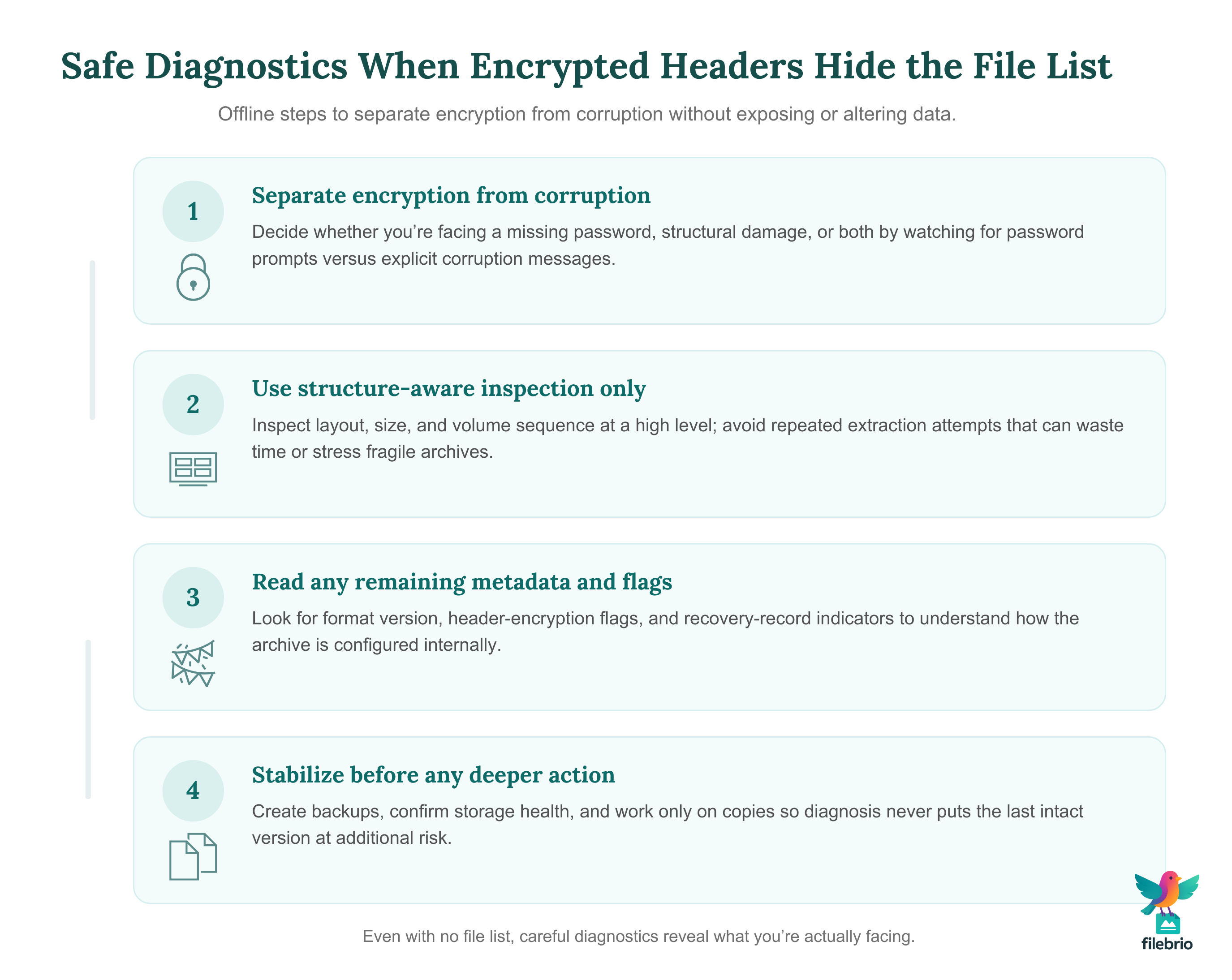
1. Distinguish Encryption from Corruption
First, you need to know whether the problem is “simply” a lack of password or genuine structural damage. If the archive consistently asks for a password and then refuses to show the file list, that’s expected with encrypted headers. If you also see corruption messages, the situation is more complex.
High-level strategies for telling encryption and damage apart are covered in how to tell if your RAR file is locked or damaged ↗️, which explains typical symptoms of each scenario.
2. Use Structure-Aware Inspection (Without Extracting)
Instead of repeatedly attempting full extraction, a safer approach is to inspect the archive’s internal layout where possible — even if the actual directory details are encrypted. For example, you can look at:
- Whether the archive appears truncated.
- Whether multi-volume sequences are complete.
- Whether non-encrypted outer structures are intact.
Concepts for doing this carefully are discussed in how to inspect internal layout of your RAR file safely ↗️, which emphasizes non-destructive checks over trial-and-error extraction.
3. Read Whatever Metadata Is Still Available
Even if file-level headers are encrypted, some high-level metadata may still be readable. That can include:
- Archive format version (e.g., RAR4 vs RAR5).
- Flags indicating whether headers are encrypted.
- Presence of recovery records or special blocks.
Interpreting these signals is easier if you understand RAR’s metadata structures; how to read metadata clues in your RAR file ↗️ walks through the kinds of hints you can still extract safely.
4. Pay Attention to Header-Related Flags
RAR header flags don’t reveal the contents themselves, but they do indicate how the archive is configured. For example, they may tell you whether filenames are hidden, whether solid compression is enabled, and how recovery records are arranged.
This kind of insight is explored in more detail in how header flags reflect your RAR file’s health ↗️, which shows how metadata can still help you understand archive health and configuration without exposing private contents.
⚙ Technical Background: RAR4 vs RAR5 and Header Protection
Encrypted headers sit at the intersection of format design and cryptography. Different RAR generations handle metadata slightly differently, but the core idea is consistent: directory information is fed through the same encryption pipeline as file data.
RAR4 vs RAR5
RAR5 introduced modernized structures and stronger defaults, including more robust key derivation and enhanced handling of large archives. While both formats can use header encryption, RAR5 tends to integrate these features more cleanly into its overall security model.
At a high level, that means:
- RAR5 archives with encrypted headers are generally harder to analyze from the outside.
- Metadata that might have been more exposed in older formats is better protected.
- Recovery planning must account for stronger, slower key derivation and better-structured encryption.
If you want to see how header protection fits into the broader security landscape of the format, how RAR4 and RAR5 secure your protected data ↗️ offers a high-level tour.
Key Derivation and the “Black Box” Effect
Modern RAR formats rely on strong key derivation functions to transform your password into an encryption key. Combined with header encryption, this means that without the correct password:
- The archive cannot reveal filenames, sizes, or directory hierarchy.
- There is no fallback “preview” mode — the tool cannot safely guess structure.
- Even small mistakes in the password result in completely unusable decrypted data.
This is exactly what you want from a security perspective, but it’s also why diagnostics and recovery feasibility estimation become more challenging.
🛡 Recovery Feasibility When Headers Are Encrypted
Encrypted headers change the nature of recovery planning. You’re no longer evaluating just “How big is this archive and how complex is the password?” You’re also dealing with “How much structure can I see, and what clues can I use to judge feasibility?”
Less Visibility, Less Feedback
When headers aren’t encrypted, you can often:
- See exactly which files extract cleanly and which fail.
- Estimate where corruption begins based on which entries break.
- Use file names and sizes as reality checks for your expectations.
With encrypted headers, that fine-grained feedback disappears. You may only see a generic “wrong password” or “corrupt archive” message, with no per-file breakdown. That makes it harder to estimate how long safe attempts might take and whether success is realistic.
For a high-level discussion of interpreting feasibility limits, including mathematical boundaries, see why strong encryption blocks access to your RAR file ↗️, which explains why some archives cross into “practically unrecoverable” territory.
When Header Encryption Meets Corruption
The most difficult cases are where both header encryption and structural damage are present. Now you’re fighting on two fronts:
- Cryptographic protections that hide directory information.
- Physical corruption that may have damaged critical blocks.
In such scenarios, recovery feasibility depends on factors like:
- How early in the archive the corruption occurs.
- Whether important metadata blocks are intact.
- Whether recovery records or external backups exist.
Because encrypted headers hide filenames and directory layout, it can be harder to know which portions of your data survived. That’s why combining secure offline tools with strong preparation habits is so important.
Staying Within Legal and Ethical Boundaries
All of this analysis assumes you are working with archives you legitimately own. Working with encrypted material you do not control raises serious legal and ethical concerns. To better understand those boundaries, you can review legal factors when accessing your encrypted RAR files ↗️, which focuses on compliance and documentation of lawful access.
🤝 Working Safely With Encrypted-Header Archives (FileBrio)
Once you confirm that the archive uses encrypted headers, diagnostics become far more sensitive. You have zero visibility, and every wrong move — online upload, aggressive repair, repeated extraction attempts — can expose or damage data. If you see:
- No filename previews to guide safe decision-making.
- No per-file error messages to distinguish corruption from wrong passwords.
- No structural hierarchy to determine which blocks matter most.
- High privacy risk when you want to panic and turn to cloud “unlocker” sites.
FileBrio RAR Master directly addresses this fragile, visibility-free scenario:
| Encrypted-Header Challenge | Offline FileBrio Capability |
|---|---|
| Zero content visibility | Header-flag recognition explains why nothing appears |
| Fear of mixed corruption + encryption | Block-level integrity checks show whether truncation or damage exists |
| Impossible to preview safely | Read-only structural scans avoid any destructive actions |
| Cloud services can’t “reveal” contents | 100% offline workflow keeps all protected data on your machine |
| Hard to judge recovery feasibility | Version- and encryption-aware reports highlight realistic boundaries |
For archives that look empty, unreadable, or corrupted — but are actually fully encrypted — FileBrio RAR Master provides the safest possible diagnostic environment. No uploads, no cloud exposure, no irreversible mistakes.
________________________
FileBrio RAR Master — a secure, offline Windows toolkit for regaining access to your own password-protected RAR / WinRAR archives while keeping all data strictly on your device.
- Offline-only processing — never uploads your archives.
- Smart issue detection — password vs corruption.
- Fast recovery workflow optimized for legitimate ownership.
⬇️ Download FileBrio RAR Master
Reminder: FileBrio RAR Master is intended only for archives you own or are explicitly authorized to access. All operations run locally on your PC.
________________________
📚 Real-World Scenarios Involving Encrypted Headers
To understand how encrypted headers affect your day-to-day work, it helps to look at practical situations you might encounter.
Scenario 1: No File List, Just a Password Prompt
You open a RAR archive and immediately see a password dialog, with no visible filenames behind it. Once you cancel, the archive appears empty or nearly empty.
What’s happening: This is classic encrypted-header behavior. The archive is refusing to reveal its contents entirely until the correct password is provided.
Safer response:
- Confirm that you are the legitimate owner of the data.
- Verify that the archive isn’t also corrupted or truncated using non-destructive checks.
- Document any password candidates in a safe place and avoid haphazard attempts.
When you’re thinking about different safe options for regaining access, how to assess safe access paths for your locked RAR file ↗️ provides a structured way to evaluate legitimate approaches.
Scenario 2: Suspected Corruption Plus Encrypted Headers
You know the archive was created with header encryption, but now tools report corruption as well. You still can’t see filenames, and you’re unsure whether the damage is minor or catastrophic.
What’s happening: Some part of the archive — possibly including critical directory blocks — may be damaged. With encrypted headers, there are fewer visible clues.
Safer response:
- Make a read-only backup copy and work only on that.
- Use structure-aware diagnostics instead of repeated extraction attempts.
- Check whether recovery records or .rev volumes exist to improve your odds.
To interpret what kind of structural damage you’re facing, it’s worth revisiting how header flags reflect your RAR file’s health ↗️, which helps you read whatever metadata is still available.
Scenario 3: Corporate Archive with Strict Privacy Requirements
Your organization requires encrypted headers for sensitive archives so that filenames don’t leak project or client details. Years later, a team needs to access those archives again — but some original knowledge has been lost.
What’s happening: The privacy requirement was met, but long-term access planning may have been incomplete. Now, header encryption is just one factor in a broader access-continuity question.
Safer response:
- Verify ownership and authorization clearly.
- Check existing documentation on passwords and archive configurations.
- Use offline tools and internal processes to avoid exposing data externally.
Designing organizational policies that keep both security and accessibility in balance is discussed in how teams can preserve long-term access to encrypted RAR files ↗️, which is especially relevant when header encryption is standard policy.
🧰 Protection Tips: Using Header Encryption Without Locking Yourself Out
Header encryption is a powerful privacy feature, but it must be used with care. The goal is to shield filenames from outsiders without hiding them permanently from your future self or your organization.
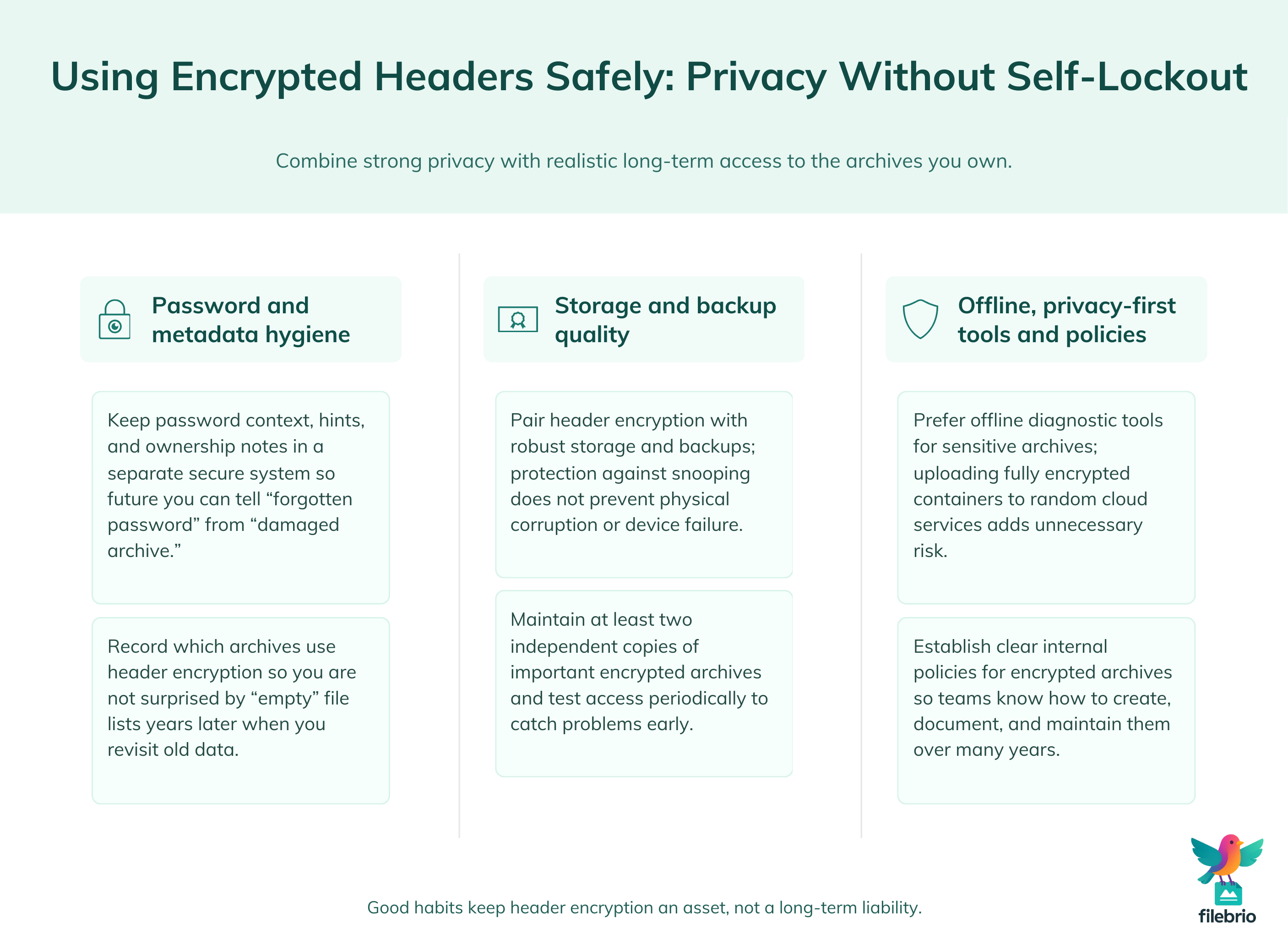
1. Store Password Metadata Safely
Because encrypted headers give you no filename-based reminders, good password metadata becomes essential. That doesn’t mean writing the password in plain text, but it does mean keeping secure hints, context, and ownership records.
Practical patterns for doing this safely are described in how to organize metadata for your RAR passwords safely ↗️, which focuses on preserving long-term access without undermining security.
2. Combine Encryption With Strong Storage Practices
There’s little point in protecting your archive’s contents if a failing disk destroys it anyway. Encrypted headers don’t protect against physical corruption; they just protect against data leakage.
That’s why it’s important to pair header encryption with robust storage strategies: verified backups, periodic integrity checks, and stable devices. For practical advice, see ways to prevent losing your RAR data on storage devices ↗️, which covers common pitfalls and safer habits.
3. Use Offline Tools for Sensitive Diagnostics
When archives contain confidential material, the last thing you want is to upload them to unknown online services just to “see what’s inside.” With encrypted headers, such services may not be able to show filenames anyway — and you’ve added unnecessary privacy risk.
Using privacy-focused offline utilities is safer. A good overview of these benefits is given in why offline tools keep your encrypted RAR data private ↗️, which explains how avoiding the cloud reduces exposure.
4. Think Long-Term: Security and Future Access
When you enable encrypted headers, ask yourself: “Will I still be able to open this in five, ten, or fifteen years?” That includes:
- Documenting which archives use header encryption.
- Ensuring password policies are realistic for long-term recall.
- Keeping recovery-friendly practices without weakening security.
Strategies for balancing strong protection with future usability are explored in how to reinforce protection of your encrypted RAR files ↗️, which emphasizes not locking yourself out of your own data.
📈 Planning Ahead: Metadata, Ownership, and Long-Term Access
Encrypted headers are just one piece of a broader lifecycle for encrypted archives. To avoid painful surprises later, you need a clear plan for metadata, ownership, and access continuity.
1. Document Ownership and Authorization
Especially in corporate or multi-user environments, you should be able to show who owns which archive and on what basis they may access it. This isn’t only a compliance issue — it also helps future teams understand which archives they can legitimately work on.
Guidelines for documenting ownership and avoiding ambiguity are discussed in how to verify ownership before accessing your RAR file ↗️, which focuses on keeping recovery activities clearly tied to legitimate control.
2. Build Policies Around Encrypted Archives
Organizations that rely heavily on encrypted archives should have written policies on:
- When to enable header encryption and why.
- How to record password metadata and access rights.
- How to handle lifecycle events like role changes or departures.
These policies help ensure encrypted headers remain an asset, not a source of permanent lockouts.
3. Plan for Tooling and Format Longevity
Finally, plan for the future of the tools themselves. Ensure that:
- You keep at least one known-good RAR-compatible tool available in your environment.
- You document the archive format used (especially when migrating from RAR4 to RAR5).
- You maintain a clear inventory of critical encrypted archives and their purpose.
Treating encrypted archives as long-lived assets, not just one-off containers, helps your future self or team avoid unnecessary data-loss scares.
📜 Legal Reminder
This article is provided for general informational and educational purposes only. Any examples, scenarios, or references to password recovery, archive security, or related tools (including FileBrio RAR Master or similar software) are intended solely to help you better understand how to protect and manage your own data.
You may only apply any techniques, workflows, or tools described here to files and archives that you fully own or are explicitly and verifiably authorized to access. Attempting to bypass, remove, or recover passwords for third-party data without clear permission may violate criminal law, civil law, or internal company policies in your jurisdiction.
Nothing in this article constitutes legal advice. Laws and regulations differ between countries and organizations, and you are solely responsible for ensuring that your actions comply with all applicable legislation, contracts, and internal policies. If you are unsure whether a particular action is lawful or permitted, consult a qualified legal professional before proceeding.
🔗 See Also — Related Guides
- How RAR Header Encryption Affects Recovery Feasibility and What Clues It Still Reveals ↗️
- How to Check Whether Your RAR Archive Uses Header Encryption (Without Specialized Tools) ↗️
- Understanding RAR Header Flags and Metadata for Transparency and Archive Health Checks ↗️
- RAR Encryption Explained: How RAR4 and RAR5 Protect Your Data ↗️
- Why Some RAR Archives Become Impossible to Open — Security Explained ↗️
- Why Offline Recovery Tools Are Safer for Privacy ↗️