
Decrypting RAR/WinRAR Archives: What Decryption Really Means and How to Handle Encrypted Files Safely
You’ve got a RAR or WinRAR archive that definitely belongs to you. You know it’s encrypted, you see a password prompt, and your first instinct is to “decrypt the file somehow” — maybe with a special tool, a website that promises instant results, or a vague idea of running something powerful on a GPU.
The problem is that “decrypting” often gets used as a catch-all word for very different actions: entering the correct password, attempting password recovery, repairing a damaged archive, or even uploading sensitive data to an unknown server that claims it can “unlock” everything. Without a clear mental model of what decryption actually is, it’s easy to misunderstand both the power and the limits of RAR encryption — and to take risky shortcuts when you’re only trying to regain access to your own files.
This article explains, in business- and privacy-friendly terms, what decryption really means for RAR/WinRAR archives, how strong encryption behaves, why some archives become effectively unrecoverable, and how to handle encrypted files you legitimately own without endangering your data or violating policy. Along the way, you’ll see how to build safe workflows, when to rely on offline tools, and how to avoid misleading “decrypt online” promises.
🧭 Navigation
Important
The information provided in this article applies exclusively to RAR / WinRAR archives for which you have full, demonstrable ownership or properly documented authorization. If you are not the rightful owner of the data, do not directly control it, or cannot clearly prove permission to access it, you must stop immediately. Attempting to access, recover, or modify data without explicit authorization may violate criminal law, civil statutes, corporate compliance requirements, and privacy regulations in many jurisdictions. You alone are responsible for ensuring that your actions are lawful and properly permitted before proceeding.
📝 TL;DR — Decryption vs. “Magic Unlocking”
Decryption is not a magic “open anything” button. In the context of RAR/WinRAR, decryption is a precise cryptographic operation: using the correct key (derived from your password) to turn encrypted data back into readable content. If you don’t have the correct password, there is no “reset” or universal backdoor. Any approach you take will either:
- Use your correct password (if you remember or recover it), or
- Systematically guess possible passwords and test them, which is limited by math and hardware.
Strong RAR encryption is intentionally designed so that random guessing quickly becomes infeasible as passwords get longer and more random. That’s good for security but means some legitimately owned archives can become practically unrecoverable if the password is truly lost. Decryption also doesn’t fix other problems: if your archive is corrupted, truncated, missing volumes, or created with incompatible settings, decryption alone can’t repair it.
Safe handling of encrypted RAR files you own starts with understanding how encryption works and what your software is really doing. From there, you can build a privacy-first workflow: diagnose whether the issue is password, corruption, or structure; avoid risky online “unlockers”; rely on trusted offline tools; and carefully evaluate whether any password recovery attempt is realistic before you start. Finally, treat every difficult case as a signal to improve your future practices — stronger but memorable passwords, stored metadata, and clear policies — so you don’t end up in the same situation again.
🧠 “Decrypting” vs. “Cracking” — What People Usually Mean
When people say they want to “decrypt a RAR file,” they often mix several ideas into one word. It helps to separate them, especially in professional or audited environments.
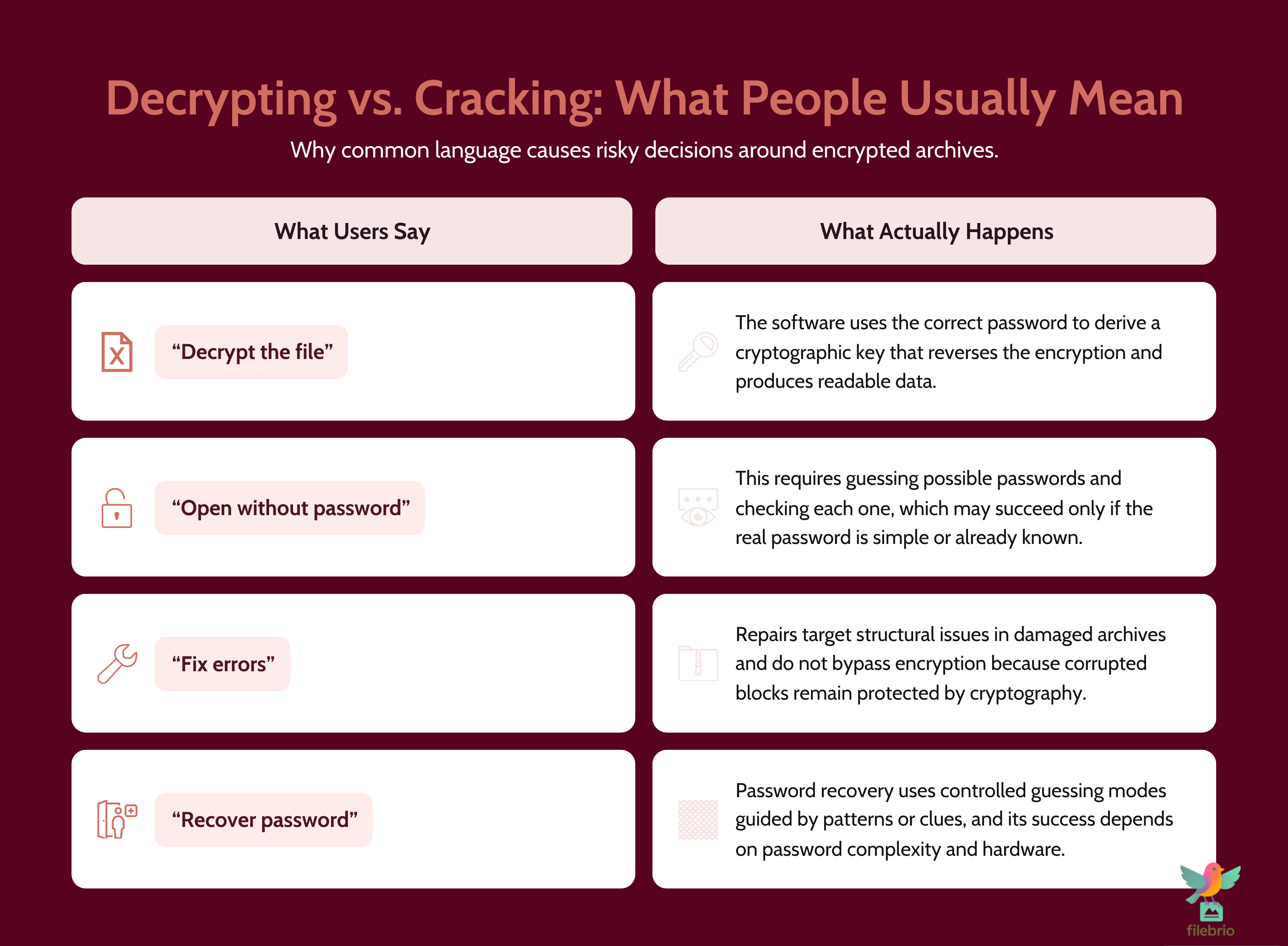
| Term | What Users Often Mean | What Actually Happens |
|---|---|---|
| Decrypt | “Make the contents readable again.” | Use the correct key (derived from the password) to reverse encryption. |
| Recover password | “Figure out or rediscover the password.” | Combine memory, context, and limited guessing in a controlled way. |
| Repair archive | “Fix an error or corruption.” | Repair or reconstruct damaged blocks, often before any decryption. |
| Open without password | “Access content even though I no longer know the key.” | Usually impossible if encryption is strong and correctly applied. |
In reality, decryption is the final step of a successful path: you confirm the archive belongs to you, ensure it’s structurally healthy, provide the correct password (or a safely recovered one), and let the software decrypt the data. Any talk of “decrypting without a password” or “instant universal decryption” should be treated with extreme skepticism, especially when sensitive data is involved.
If you want a bigger picture of how passwords, encryption, and access options fit together, how encryption controls access to your protected RAR contents ↗️ offers a high-level map of the moving pieces behind the simple password prompt.
🔑 How RAR Encryption and Decryption Actually Work (High Level)
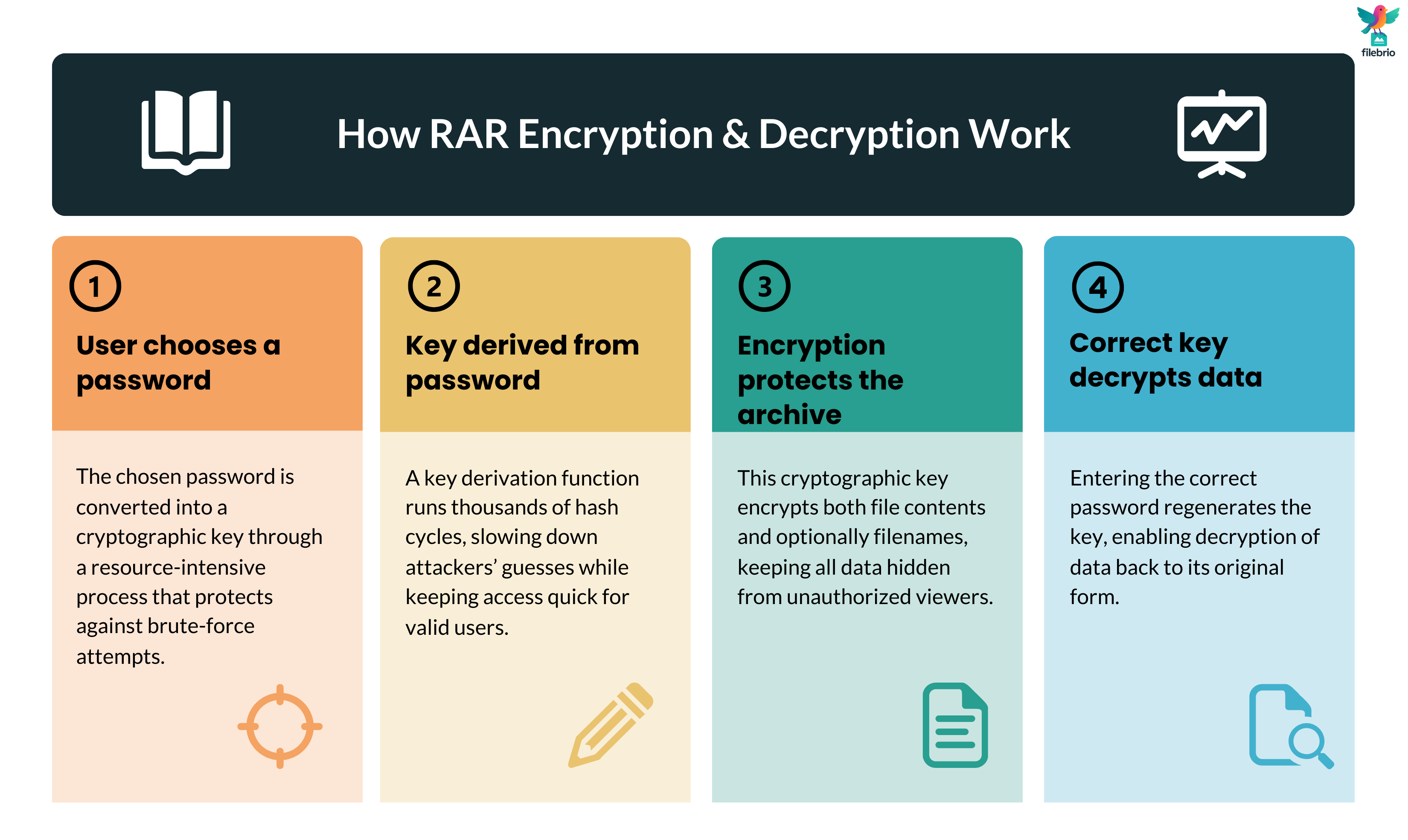
RAR encryption is built so that decryption is easy only for someone who knows the password. At a conceptual level, the process looks like this:
- You choose a password when creating the archive.
- The software passes that password through a key derivation function to produce a strong cryptographic key.
- That key is used with modern encryption algorithms to protect the archive’s contents (and possibly headers and filenames).
- To decrypt, you provide the same password; the key derivation function reproduces the same key, which the software uses to reverse the encryption.
The details differ between RAR4 and RAR5, but both are designed so that, with a good password, brute-force guessing becomes extremely slow and expensive. For a gentle introduction to how the formats use modern ciphers to protect your data, see RAR encryption explained for RAR4 and RAR5 ↗️.
Two important consequences follow from this design:
- There is no hidden “reset password” channel built into the archive. If you forget the password, the format itself doesn’t contain a backdoor.
- Because encryption is strong, decryption depends fully on your password. If the password is truly lost and the search space is huge, no software can promise a guaranteed recovery on a realistic timescale.
This is why, as explained in why your forgotten RAR password cannot be reset ↗️, the security model for encrypted archives is very different from email or web accounts. There is no central provider who can verify your identity and send you a new password—the encrypted archive stands alone.
🧊 What Decryption Can Do — and What It Can Never Do
Understanding what decryption cannot do is just as important as knowing what it can. This prevents unrealistic expectations and helps you design safer policies.
What proper decryption can do:
- Restore readable data from an encrypted archive when you provide the correct password.
- Respect header and filename settings: if headers were encrypted, decryption reveals them only after successful key verification.
- Operate deterministically: the same password either works or doesn’t; there’s no partial or fuzzy success mode.
What decryption cannot do:
- Recover content from an archive that is heavily corrupted or truncated beyond repair.
- Reveal information from an archive with fully encrypted headers before the correct password is supplied.
- Ignore strong cryptography and “open” without the key; if that were possible, the protection would be meaningless.
Encrypted headers are a good illustration. When header encryption is enabled, you may not even see a file list until the correct password is provided. That can feel mysterious, but it’s by design: why encrypted headers make content discovery impossible ↗️ explains how this behavior protects your metadata and what it implies for recovery expectations.
In some cases, filename encryption also hides the names of files inside the archive, further reducing the amount of information an observer can gather. For a more targeted discussion of that feature, see RAR filename encryption explained ↗️. All of these mechanisms ensure that true decryption is an all-or-nothing operation based on the correct key, not a “peek under the curtain” without proper credentials.
🧰 All-In-One Offline Toolkit for Safe Decryption Workflows
Once you understand that decryption depends entirely on the correct password and a healthy archive, the next question becomes practical: how do you diagnose and handle your own encrypted RAR files safely? Switching between multiple ad-hoc tools makes it easy to misinterpret error messages or, worse, send sensitive data to untrusted locations.
A dedicated, offline toolkit simplifies this by putting everything in one place:
- Archive diagnostics to tell you whether you’re facing password issues, corruption, or missing volumes.
- Format awareness for RAR4 and RAR5, including encryption flags, header options, and recovery records.
- Privacy-first design, so nothing leaves your machine while you investigate your own archives.
- Carefully bounded password recovery modes that respect legal and organizational boundaries.
If you want to see how such a toolkit can support safe, realistic decryption workflows, the FileBrio RAR Master features overview ↗️ outlines how diagnostics, repair, and legitimate password work live together in a single, offline suite that’s easier to govern than scattered utilities.
________________________
FileBrio RAR Master — part of the FileBrio Office Suite — is a privacy-first, offline Windows toolkit for diagnosing and safely regaining access to your own password-protected RAR / WinRAR archives.
- Local processing only — nothing leaves your PC.
- Smart diagnostics to separate password issues from corruption.
- Owner-verified recovery workflows designed strictly for legitimate use.
Reminder: FileBrio RAR Master may be used only with archives you own or are explicitly authorized to access. It performs all analysis and recovery operations locally on your device, without uploading data anywhere.
________________________
🧩 How to Tell What Kind of Encryption Your RAR Archive Uses
Before you decide what “decrypting” might involve in practice, you should know how your archive is encrypted. Different choices at creation time change what you can see and what recovery options exist.
Key questions include:
- Is the archive using RAR4 or RAR5 structures?
- Are headers and filenames encrypted, or only the file data?
- Are there recovery records or .rev volumes present?
For example, if header encryption is active, you may see almost nothing about the archive until the correct password is provided. If recovery records and companion volumes exist, some structural damage might be repairable before any decryption attempt. A high-level discussion of how recovery mechanisms shield fragile data is available in how recovery records safeguard your damaged RAR files ↗️.
The strength of the key derivation function also matters. In modern RAR5, the key derivation function is deliberately expensive, making each password attempt slower but more secure from an attacker’s perspective. To understand why this matters for long-term protection and realistic recovery planning, see why the RAR5 key derivation function matters for security ↗️. Knowing these details helps you avoid both false hope and unnecessary despair when you evaluate your own encrypted archives.
🌐 Why Online “Decryption” Services Are Risky for Your Privacy
When you search the web for help, you’ll quickly find sites claiming they can “decrypt” or “unlock” your RAR/WinRAR archives online. For sensitive data, this is almost always a bad trade-off.
Primary risks include:
- Loss of control: once you upload the archive, you can’t easily know who has access to it or how long it will be stored.
- Opaque methods: you have no visibility into how the service attempts access, or whether it blends your data into future datasets.
- Weak or misleading promises: if your archive uses strong encryption with a long, random password, no online shortcut changes the underlying math.
Some services frame their offer as “decryption” to sound more capable than they are; in reality, they may just run limited password attempts behind the scenes, or worse, do almost nothing while collecting data. For a deeper discussion of why such tools often disappoint and how they can endanger sensitive archives, see why online RAR tools fail ↗️.
Especially in regulated or corporate environments, policies should make it clear that uploading encrypted archives to unvetted web services is not acceptable. Instead, recovery attempts must be done in controlled offline environments that preserve confidentiality and align with compliance requirements.
🛡️ Building a Safe Offline Workflow for Your Own Encrypted Archives
A safe decryption workflow doesn’t start with guessing—it starts with diagnostics and confirmation. When you work only with archives you legitimately own, an offline process can protect both your privacy and your time.
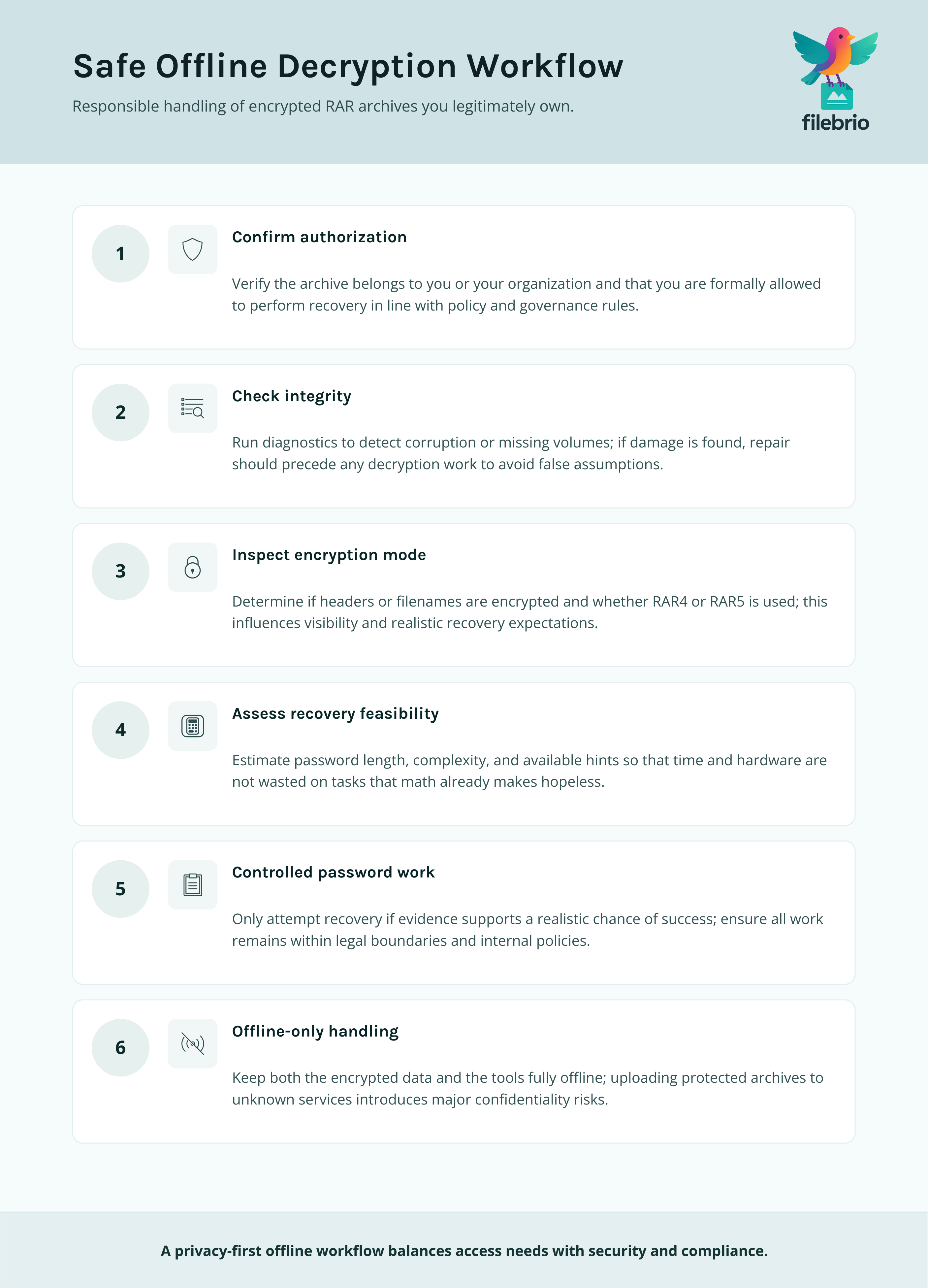
A robust offline workflow typically includes:
- Verification that the archive is yours and that you’re authorized to access it.
- Structural checks to determine whether corruption or missing data is present.
- Encryption mode inspection (headers, filenames, format version) to set realistic expectations.
- Feasibility analysis of any password recovery effort, based on password length and entropy.
Only if all of these steps suggest there is a reasonable chance of success should you consider controlled password work. For a privacy-first argument in favor of local tools and offline handling, see why offline tools keep your encrypted RAR data private ↗️.
Before you invest time or GPU cycles, it’s worth reviewing whether any recovery attempt is realistically within reach. Conceptual time estimates can help here: the password strength and time-to-crack estimation tool ↗️ is designed to illustrate how quickly complexity scales, so you don’t assume that “trying everything” is always an option.
🛠️ Secure Offline Environment for Responsible Decryption
Putting theory into practice means having an environment where your staff—or you personally—can apply these principles without fighting the tooling. A secure, offline suite tailored for RAR archives can make the difference between ad-hoc, risky improvisation and a controlled, repeatable process.
In a well-designed environment, you should be able to:
- Run structural and integrity diagnostics on a copy of the archive before touching any password options.
- See exactly which encryption features are in use and how they affect visibility and feasibility.
- Apply carefully scoped password recovery techniques only on archives you own and can document.
- Keep logs, if needed, for internal audits that show how encrypted archives were handled.
Comparisons between online and offline handling are explored in more detail in offline vs. online RAR recovery approaches ↗️, which can support security teams in justifying an “offline first” policy. When you’re ready to install or update your local toolkit, you can obtain FileBrio tools from the official download page ↗️ to ensure you’re working with verified, up-to-date software rather than untrusted binaries.
________________________
FileBrio RAR Master — a secure, offline Windows toolkit for regaining access to your own password-protected RAR / WinRAR archives while keeping all data strictly on your device.
- Offline-only processing — never uploads your archives.
- Smart issue detection — password vs corruption.
- Fast recovery workflow optimized for legitimate ownership.
⬇️ Download FileBrio RAR Master
Reminder: FileBrio RAR Master is intended only for archives you own or are explicitly authorized to access. All operations run locally on your PC.
________________________
📂 Handling Legitimate Recovery Attempts Without Overstepping
Even with the best practices, you may sometimes find yourself locked out of archives you genuinely own. Handling those cases responsibly requires both technical care and governance.
1. Confirm ownership and authorization. Before any intensive recovery work, make sure the archive truly belongs to you or your organization and that there is clear authorization to attempt access. High-level guidance on evaluating safe options is given in how to assess safe access paths for your locked RAR file ↗️, which focuses on avoiding overreach even when you’re under pressure.
2. Treat password work as a last resort. Diagnostics, metadata review, and archive repair options should come first. In some cases, older unencrypted backups or alternate sources of the same data may exist, making password work unnecessary.
3. Keep actions auditable. In organizations, it’s wise to document who authorized a recovery attempt, which tools were used, and how results were handled. This protects both the individuals involved and the company if questions arise later.
4. Align with formal responsible-use policies. Official policies and support materials should clearly state acceptable use. For example, your legal and security teams might reference a centralized resource such as the support and responsible use guidelines ↗️ associated with your chosen toolkit to keep decisions aligned with broader compliance obligations.
📦 Designing Archives Today So Decryption Stays Possible Tomorrow
The easiest decryption problems are the ones you never have to solve. Thoughtful design when creating encrypted archives today can save enormous effort in the future.
Consider building the following ideas into your standard operating procedures:
- Use strong but manageable passwords: long, structured phrases that staff can recall or document safely, instead of short, risky patterns.
- Store metadata and hints securely: not the raw passwords, but descriptive notes that help future teams understand how access was intended to work.
- Align archive practices with retention policies: make sure encrypted archives are catalogued, with clear owners and custodians, so they don’t become orphaned over time.
- Document formats and tools: record which software versions and options were used, so future staff can reproduce compatible environments.
For team-centric approaches to metadata and long-term access, how teams can organize shared RAR password metadata ↗️ is a useful reference when you’re turning these ideas into concrete policy. And when your goal is to tighten security without creating unrecoverable data, how to strengthen RAR archive security while preserving future access ↗️ offers practical patterns that balance cryptographic strength with operational reality.
⚖️ Legal & Ethical Reminder
This article is provided for general informational and educational purposes only. Any examples, scenarios, or references to password recovery, archive security, or related tools (including FileBrio RAR Master or similar software) are intended solely to help you better understand how to protect and manage your own data.
You may only apply any techniques, workflows, or tools described here to files and archives that you fully own or are explicitly and verifiably authorized to access. Attempting to bypass, remove, or recover passwords for third-party data without clear permission may violate criminal law, civil law, or internal company policies in your jurisdiction.
Nothing in this article constitutes legal advice. Laws and regulations differ between countries and organizations, and you are solely responsible for ensuring that your actions comply with all applicable legislation, contracts, and internal policies. If you are unsure whether a particular action is lawful or permitted, consult a qualified legal professional before proceeding.
📚 See Also: Deep Dives on RAR Encryption & Access
- How RAR Security Works and Why Passwords Can’t Be Reset Like Email Credentials ↗️
- Why Offline Recovery Tools Are Safer for Privacy ↗️
- Open RAR Files Without a Password? What’s Possible, What Isn’t, and How to Access Your Data Safely ↗️
- Online RAR/WinRAR Unlockers: Hidden Risks and Why Local Tools Offer Better Security ↗️
- Restoring Access to RAR/WinRAR Archives: Safe and Legal Methods for Handling Your Own Files ↗️
- Why Some RAR Archives Become Impossible to Open — Security Explained ↗️
- Free RAR/WinRAR Password Recovery Tools: Safe, Offline Options for Accessing Your Own Files ↗️