
What “Breaking” a RAR/WinRAR Password Really Means — and How to Safely Work With Your Own
When people search the web for how to “break a RAR password,” they’re rarely trying to dissect cryptography. They are stuck in a very human situation: an important archive won’t open, they are under time pressure, and they want a shortcut that just works. Search engines respond with dramatic language and risky tools, but the underlying problem is usually simpler: you have an encrypted RAR archive you own, and you no longer know how to open it safely.
This article unpacks what the phrase “break a RAR/WinRAR password” actually describes, why it’s often misleading, and how to translate that frustration into safe, non-destructive actions. We’ll look at how RAR passwords and encryption really work, how to assess your own situation, which options are realistic for your specific archive, and why offline, privacy-first tools and clear legal boundaries are essential for any legitimate recovery attempt.
🧭 Navigation
Important
The information provided in this article applies exclusively to RAR / WinRAR archives for which you have full, demonstrable ownership or properly documented authorization. If you are not the rightful owner of the data, do not directly control it, or cannot clearly prove permission to access it, you must stop immediately. Attempting to access, recover, or modify data without explicit authorization may violate criminal law, civil statutes, corporate compliance requirements, and privacy regulations in many jurisdictions. You alone are responsible for ensuring that your actions are lawful and properly permitted before proceeding.
📌 TL;DR — What “Break A RAR Password” Really Means
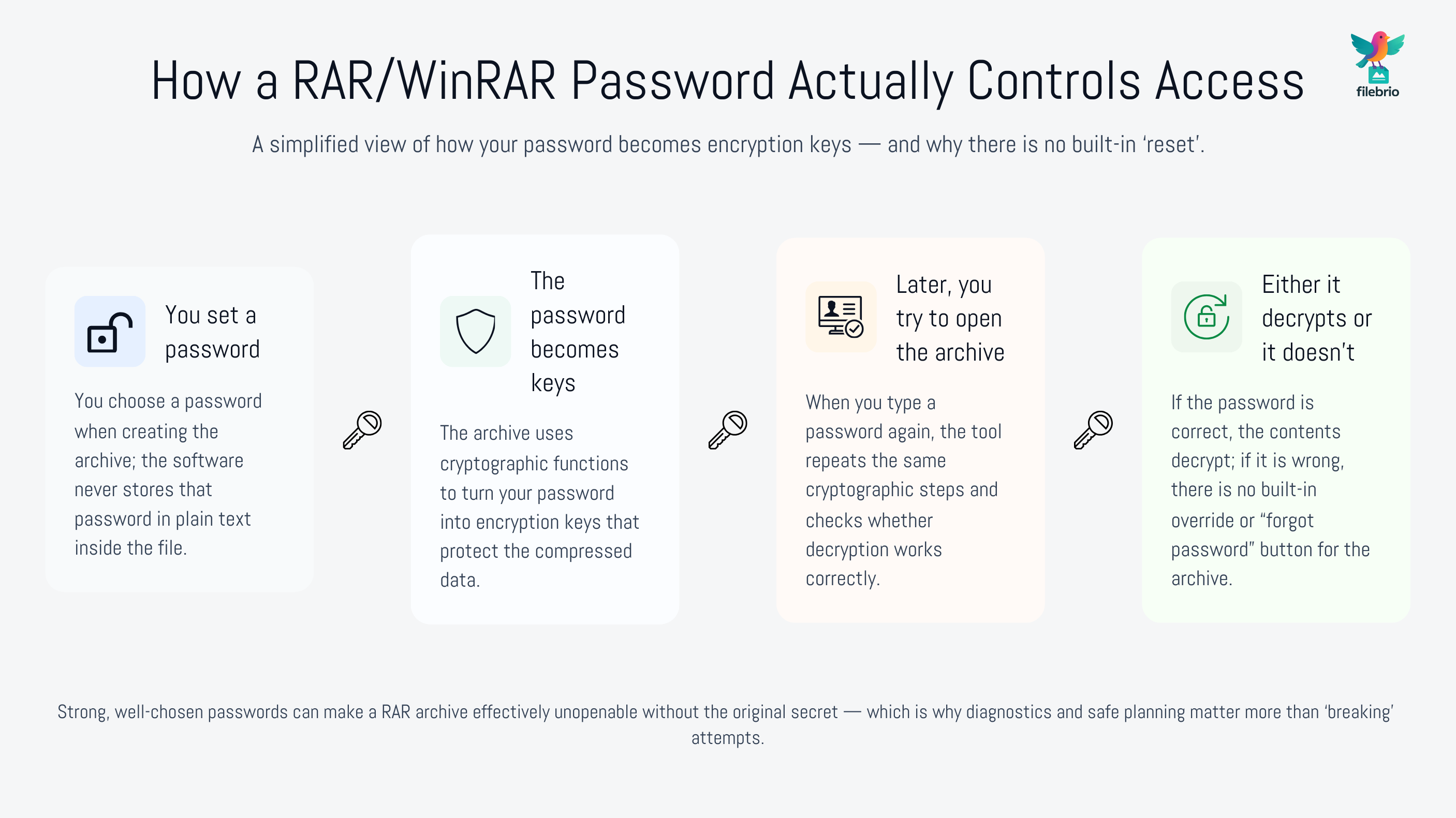
The phrase “break a RAR password” is a fuzzy shortcut that blends together several different ideas: fixing a corrupted archive, guessing a forgotten password, or using a easier access path that doesn’t exist in reality. When you have a locked RAR/WinRAR archive you legitimately own, your real task is not to “break” anything, but to understand what blocks access and then choose a safe, lawful option based on that situation.
Modern RAR archives use strong encryption. If your password is truly long and complex, there is no magic button that can simply “break” it. In many cases, your best options are behavioral and procedural: reconstructing the password using memory cues, checking whether the archive is corrupted rather than locked, verifying that you are using the correct file, or accepting that some combinations of format, password strength, and encryption settings are effectively unopenable in practice. When technical recovery is feasible, it still must be done with privacy-first, offline tools on archives you own — not with random online services that ask you to upload sensitive files.
Instead of focusing on the word “break,” think in terms of diagnose → confirm ownership → choose a safe access path. That path might involve carefully reviewing your own password habits, confirming that you’re not dealing with file damage, and only then evaluating whether any legitimate recovery attempts make sense within your legal and organizational rules. The goal is to protect your data and your obligations — not to chase marketing language that promises more than cryptography will allow.
🧠 What People Mean When They Say “Break A RAR/WinRAR Password”
Most users do not think in terms of key derivation functions, entropy, or attack surfaces. When they type “break a RAR password” into a search engine, they’re expressing frustration and asking a broad question: “How do I open this locked archive?” That single phrase can hide several different scenarios:
- You own the archive but genuinely forgot the password.
- You might be using the wrong password on the right file.
- The archive might be corrupted or incomplete, not simply locked.
- A colleague created the archive and is not available anymore.
Understanding this distinction is important because safe and ethical guidelines like ethical ways to handle your encrypted RAR files ↗️ apply to all of them. In every case, the key principle is the same: you should only ever attempt access to files you own or are explicitly authorized to handle. The term “break” should never be used to justify opening archives that belong to someone else or were obtained without clear consent.
It is also why many educational resources avoid that word altogether. When we talk about “handling locked archives,” we focus on diagnostics, ownership verification, and safe options for legitimate users — not on shortcuts that ignore encryption design and legal boundaries.
🔐 How RAR Passwords And Encryption Actually Work
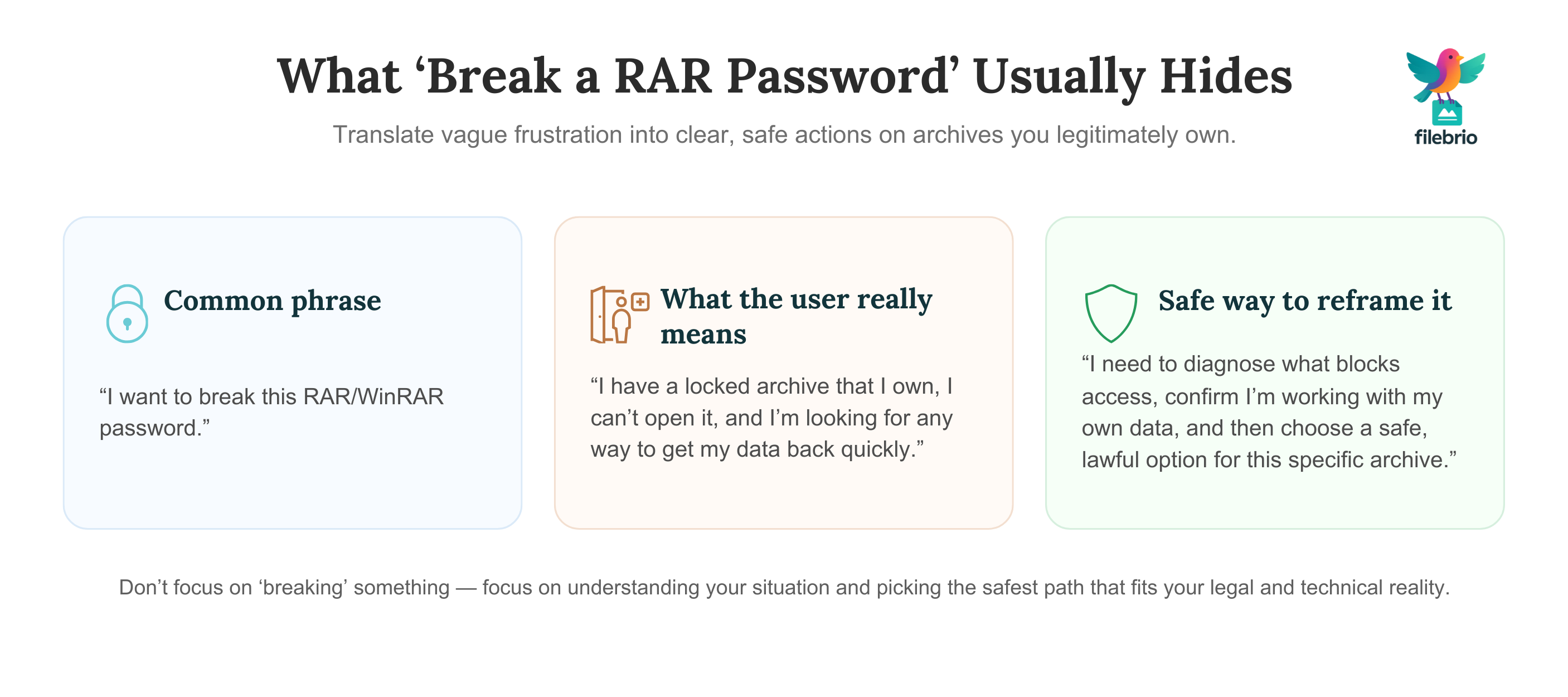
To evaluate what is possible in your situation, you need a conceptual picture of how RAR encryption works. RAR archives do not store your password. Instead, the password you type is processed through cryptographic functions that derive keys used to decrypt the archive’s contents. If the password is wrong, the decryption fails and you see errors or repeated prompts. There is no built-in “reset” comparable to email or account recovery processes.
High-level explanations such as how encryption controls access to your protected RAR contents ↗️ describe this behavior in more detail. For our purpose, two points matter:
- Strong encryption means there is no hidden override. If the password and key derivation are robust, you cannot simply flip a bit to open the archive.
- Complex passwords drastically change feasibility. A short, simple password might be theoretically testable; a long, complex one can push testing time far beyond any meaningful horizon.
When people talk about “breaking a password,” they often imagine that any password can be removed with enough effort. In reality, as explored in how to understand limits on guessing your RAR password ↗️, modern RAR archives can be so resistant to guessing that recovery is effectively impossible. That is why safe approaches put so much emphasis on diagnostics and memory-based reconstruction before considering any technical recovery attempts.
🧐 First Step: Assessing Your Own Situation Safely
Before you look for tools or techniques, you should clarify what kind of problem you are facing. Are you dealing with a forgotten password, a damaged file, or a mixture of both? A calm, structured assessment will often save you time and prevent unnecessary risk.
Resources like how to evaluate your situation after losing your RAR password ↗️ and what you can and cannot do with your locked RAR file ↗️ outline typical questions to ask yourself:
- Did the archive ever open successfully on this device?
- Could you be confusing this archive with another one that uses a different password?
- Is the error message clearly about a wrong password, or is it about corruption or unexpected end of archive?
- Do you have any notes, metadata, or patterns that might help reconstruct the original password?
From there, you can examine safe access paths as summarized in how to assess safe access paths for your locked RAR file ↗️. Maybe the password is weak enough that recovery is feasible; maybe practical estimates show it is unrealistic to test all possibilities; maybe the archive is damaged and needs repair first. In every case, a better understanding of the situation is more useful than the vague intention to “break” something.
🧰 All-In-One Solution For Safe, Offline RAR Handling
Once you know what kind of problem you are dealing with, you still need a way to handle your archives that matches your privacy, legal, and policy requirements. Jumping between random utilities and online sites quickly becomes unsafe. A better approach is to standardize on a single, audited toolkit designed for legitimate owners of encrypted RAR/WinRAR archives.
A dedicated suite like app capabilities overview ↗️ can act as a central environment where you:
- Inspect archive metadata and error messages in a controlled way.
- Confirm whether you are dealing with password issues or corruption.
- Work with diagnostics, repair features, or lawful recovery options entirely offline.
If you reach a point where some form of password recovery is technically and legally appropriate, a privacy-first module such as a RAR password recovery tool ↗️ can help you explore options for your own archives without sending data to third parties. At the same time, you can educate yourself with materials like how secure archives behave during access attempts ↗️, so you understand why certain archives may be realistically unopenable.
When you are ready to deploy a standardized toolkit across your environment, you can obtain it from a trusted distribution channel instead of ad-hoc downloads. For example, your IT team might get the FileBrio tools installer ↗️ from the official Office Suite download page and roll it out to users who need to work with encrypted archives under clear, documented rules.
________________________
FileBrio RAR Master — part of the FileBrio Office Suite — is a privacy-first, offline Windows toolkit for diagnosing and safely regaining access to your own password-protected RAR / WinRAR archives.
- Local processing only — nothing leaves your PC.
- Smart diagnostics to separate password issues from corruption.
- Owner-verified recovery workflows designed strictly for legitimate use.
Reminder: FileBrio RAR Master may be used only with archives you own or are explicitly authorized to access. It performs all analysis and recovery operations locally on your device, without uploading data anywhere.
________________________
🧱 Myths vs Reality: What Is (And Isn’t) Possible To “Break”
The phrase “break a password” encourages myths. It suggests that any archive can be opened, given enough cleverness or the right tool. In reality, there are strict mathematical and practical limits, especially with strong passwords and modern encryption settings.
High-level guidance in what you can and cannot do with your locked RAR file ↗️ and why some RAR archives become impossible to open ↗️ emphasizes several important truths:
- Some archives are effectively unopenable. If the password is long, random, and well-chosen, no realistic amount of computation can “break” it.
- Weak passwords are still risky. Short or predictable passwords may be guessable in practice, which is why strong password and metadata habits are so important.
- Online tools rarely disclose their limits. Many sites imply they can open anything, but in practice they may fail silently while still keeping your data.
At the same time, legal and ethical boundaries still apply, as detailed in legal factors when accessing your encrypted RAR files ↗️. Even if a password were technically guessable, it does not mean it is lawful to attempt that on archives you do not own or are not clearly permitted to access. Responsible users treat these constraints as part of the environment, not as obstacles to be bypassed.
🛟 Safe Access Options For Your Own Locked Archives
Once you understand the limits, you can focus on concrete, safe options for archives that you legitimately own. These options are less about “breaking” passwords and more about working with your own behavior, metadata, and tools.
Typical safe paths include:
- Memory-based reconstruction. Reviewing your own patterns and context, often guided by resources like those discussed in broader password behavior articles.
- Diagnostics first, recovery second. Before any recovery attempt, ensure that the archive itself is healthy; corruption can masquerade as password failure.
- High-level feasibility evaluation. Using conceptual estimates, like those discussed in guidelines for responsible handling of your secured archive ↗️, to decide whether recovery is realistic or essentially impossible.
When the situation justifies it and you remain within legal boundaries, you can consider contacting a trusted specialist or using a controlled local toolkit to work with your own archives, as outlined in restoring access to RAR/WinRAR archives with safe and legal methods ↗️. The key is that you do not treat “break” as a license to try anything; you treat it as a reminder to act carefully, methodically, and responsibly.
🛡️ Secure Offline Solution Instead Of Risky Online Tools
When searching for ways to “break” a password, users often land on websites that promise instant results in the browser. These sites typically require you to upload your encrypted archive to someone else’s server — a serious privacy risk if the file contains sensitive personal or business data. Even if their intentions are honest, you lose control the moment the upload finishes.
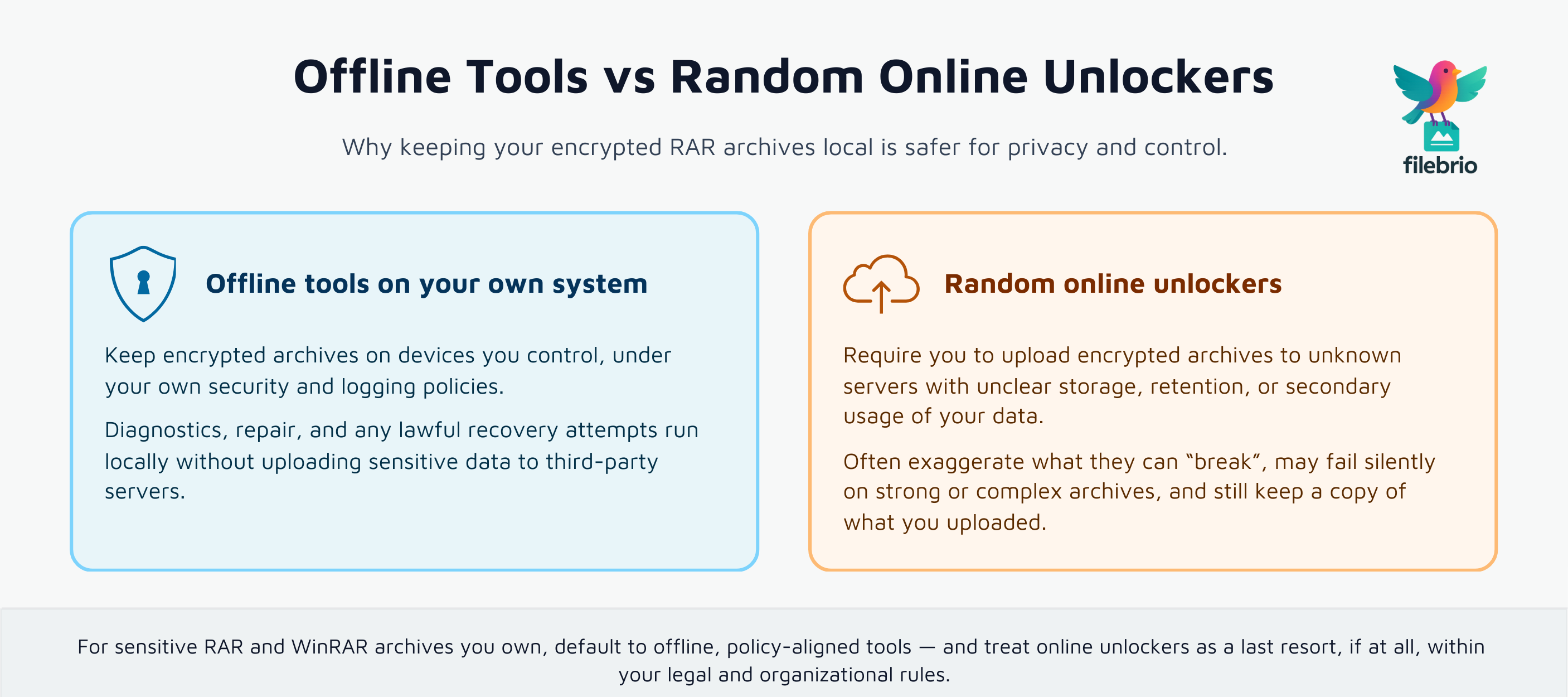
Safer patterns are described in why offline tools keep your encrypted RAR data private ↗️ and why opening RAR files online risks your protected data ↗️. The core message is simple: keep encrypted archives local whenever possible. That means working with tools installed on your own systems, under your own administrative and logging frameworks, instead of cloud services with unknown storage, retention, or secondary usage.
Many “break password” sites also exaggerate what they can do. As explained in why online RAR password tools fail — and what legitimate users can do instead ↗️, they may only handle trivial cases, fail silently on complex archives, or present generic errors after uploading. You end up with no access, possible privacy issues, and no meaningful explanation of why the archive remains locked.
By contrast, an offline toolkit operated under your own policies can combine diagnostics, repair, and lawful recovery in one place. A comparison like compare online unlockers and local tools ↗️ can help you explain to colleagues or management why offline methods should be the default choice. If you need to communicate realistic expectations, a high-level utility such as a RAR password strength estimator ↗️ can illustrate how complexity and length shape practical feasibility, without exposing your archive to third parties.
________________________
FileBrio RAR Master — a secure, offline Windows toolkit for regaining access to your own password-protected RAR / WinRAR archives while keeping all data strictly on your device.
- Offline-only processing — never uploads your archives.
- Smart issue detection — password vs corruption.
- Fast recovery workflow optimized for legitimate ownership.
⬇️ Download FileBrio RAR Master
Reminder: FileBrio RAR Master is intended only for archives you own or are explicitly authorized to access. All operations run locally on your PC.
________________________
⚙️ Staying Legal, Documented, And Responsible
Finally, any conversation about “breaking a RAR password” must end with legal and ethical clarity. You are responsible for ensuring that your actions comply with the law, with your organization’s policies, and with your obligations to clients, partners, or data subjects.
This is where guidance like guidelines for responsible access to your protected data ↗️ and how to assess safe access paths for your locked RAR file ↗️ becomes essential. Good practice includes:
- Verifying ownership and authorization. Ensure the archive and its contents are yours to handle, following ideas similar to ownership and legitimacy checks used elsewhere in your security policies.
- Documenting decisions. Record why you are attempting access, what steps you took, and which tools you used.
- Using only approved tools. Stick to offline, policy-aligned utilities covered by your internal standards and, where applicable, by a documented responsible use and support policy ↗️.
In complex cases — for example, archives containing regulated personal data — you may need sign-off from legal, compliance, or data protection officers before proceeding. The goal is never to “beat” encryption at any cost, but to protect the rights of everyone whose data is inside the archive, including yourself.
⚖️ Legal Reminder
This article is provided for general informational and educational purposes only. Any examples, scenarios, or references to password recovery, archive security, or related tools (including FileBrio RAR Master or similar software) are intended solely to help you better understand how to protect and manage your own data.
You may only apply any techniques, workflows, or tools described here to files and archives that you fully own or are explicitly and verifiably authorized to access. Attempting to bypass, remove, or recover passwords for third-party data without clear permission may violate criminal law, civil law, or internal company policies in your jurisdiction.
Nothing in this article constitutes legal advice. Laws and regulations differ between countries and organizations, and you are solely responsible for ensuring that your actions comply with all applicable legislation, contracts, and internal policies. If you are unsure whether a particular action is lawful or permitted, consult a qualified legal professional before proceeding.
📚 See Also
- Open RAR Files Without A Password? What’s Possible, What Isn’t, And How To Access Your Data Safely ↗️
- Restoring Access To RAR/WinRAR Archives: Safe And Legal Methods For Handling Your Own Files ↗️
- How To Evaluate Safe Options For Regaining Access To A RAR/WinRAR Archive You Own ↗️
- Why Offline Recovery Tools Are Safer For Privacy ↗️
- Why Online RAR Password Tools Fail — And What Legitimate Users Can Do Instead ↗️
- Legal Considerations When Working With Your Own Encrypted Archives ↗️
- Lost Your RAR/WinRAR Password? How To Assess Your Situation Before Taking Action ↗️