

What RAR5 Quick Open Records and Recovery Blocks Do (High-Level Guide)
If you work with large or important RAR archives, you’ve probably noticed that some of them open almost instantly, even when they’re encrypted or stored on slower drives. Behind that “instant” feeling are special RAR5 structures called Quick Open Records and recovery blocks. They can dramatically improve how usable and resilient your archives feel — but when something goes wrong, they can also be the difference between a smooth repair and a permanent loss.
This guide explains, in high-level terms, what Quick Open Records and recovery blocks do, how they interact with RAR5 encryption, and how you can use them safely on archives you own. We’ll stay within legal and ethical boundaries, focus on privacy-first, offline workflows, and show where a tool like FileBrio RAR Master can help you understand and protect your own RAR files.
🧭 Navigation
Important
The information provided in this article applies exclusively to RAR / WinRAR archives for which you have full, demonstrable ownership or properly documented authorization. If you are not the rightful owner of the data, do not directly control it, or cannot clearly prove permission to access it, you must stop immediately. Attempting to access, recover, or modify data without explicit authorization may violate criminal law, civil statutes, corporate compliance requirements, and privacy regulations in many jurisdictions. You alone are responsible for ensuring that your actions are lawful and properly permitted before proceeding.
📝 TL;DR — Quick Open Records & Recovery Blocks in a Nutshell
RAR5 includes two structural features that significantly improve how usable and resilient your archives feel: Quick Open Records and recovery blocks. Quick Open Records act as a compact internal index, allowing tools to display archive contents almost instantly without scanning every header or volume from start to finish. This matters most when working with large backups or multi-volume sets, where “instant opening” depends on fast structural navigation rather than reduced security. Recovery blocks, on the other hand, introduce built-in redundancy. When part of an archive becomes slightly corrupted or a segment goes unreadable, these blocks can sometimes help reconstruct limited areas of damage, increasing the chances that the archive remains usable.
Neither feature bypasses encryption or weakens password protection; encrypted data remains fully dependent on the correct password and RAR5’s modern key-derivation design. What these features provide is efficiency, diagnostic value, and a more forgiving experience when storage problems or transfer errors appear. When Quick Open Records or recovery blocks are missing or damaged, tools may still open the archive, but performance drops and resilience decreases. Understanding these structures helps you make safer decisions about storage, diagnostics, and whether a damaged RAR file you own is realistically repairable — especially when working within a cautious, offline, privacy-first workflow.
🧠 RAR5 Basics: Why Internal Structures Matter
RAR archives are more than just “containers” that hold a list of files. Inside every archive is a structured layout of headers, flags, metadata, and data blocks that describes what’s stored and how it should be extracted. With RAR5, this internal structure was modernized to support stronger encryption, better metadata, and additional resilience features.
At a high level, RAR5 archives use:
- Main headers describing archive-wide settings and format version.
- File headers listing each entry’s name, size, and attributes.
- Optional indexes and records such as Quick Open Records to speed scanning.
- Redundant blocks such as recovery data that can help reconstruct damaged parts.
From a security perspective, the encryption layer still controls access to the actual file contents. If you want a broader conceptual overview of how RAR4 and RAR5 encryption protect your data, see how RAR4 and RAR5 secure your protected data ↗️ (high-level explanation, no commands).
Quick Open Records and recovery blocks do not weaken this protection. Instead, they change how efficiently software can move around inside the archive, detect problems, and attempt repairs — especially important when dealing with large backups, long-term archives, or corporate data sets that can’t simply be recreated.
⚡ Quick Open Records: Making Large Archives Feel Instant
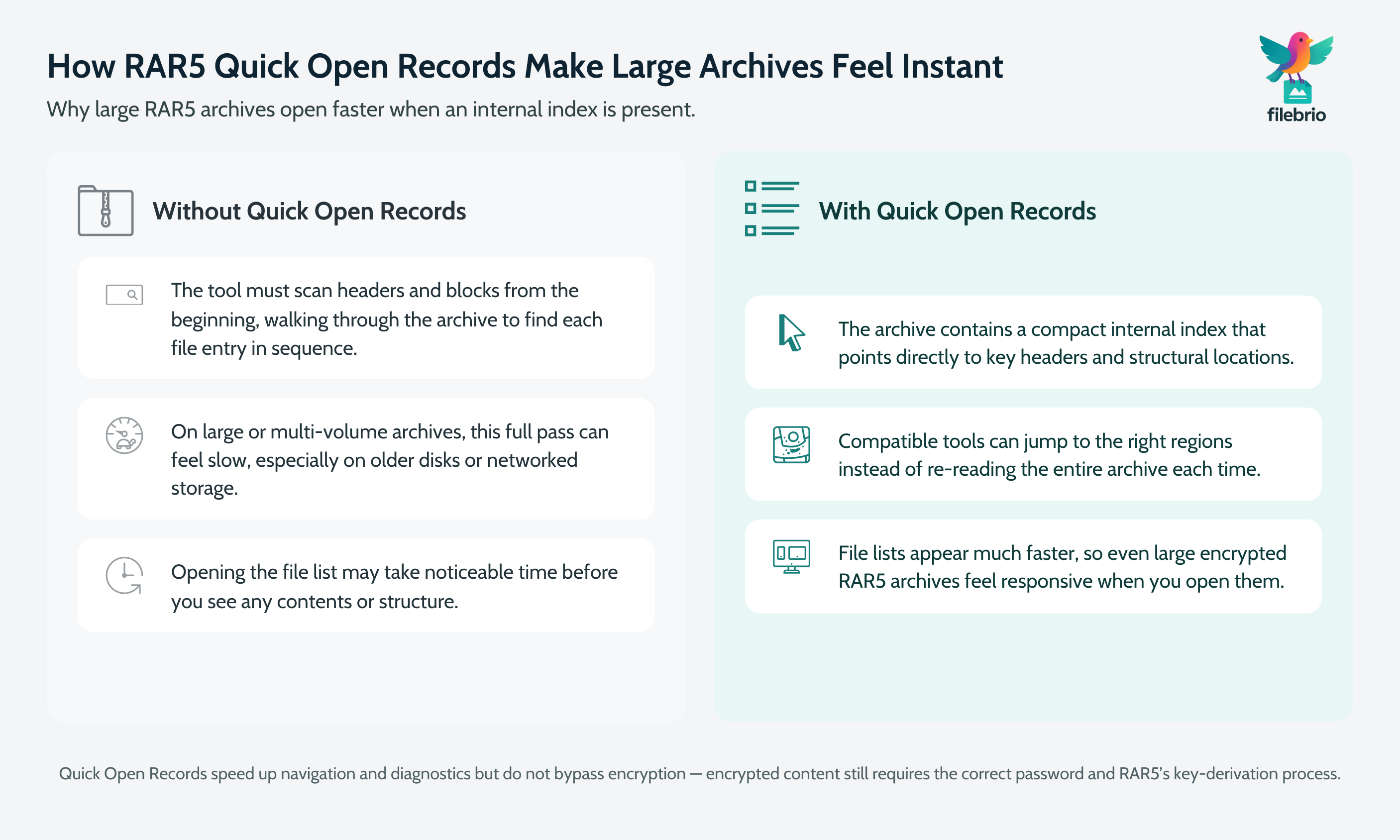
Quick Open Records are RAR5’s answer to a practical problem: as archives grow, naively scanning every header from start to finish becomes slow. Users feel this as a delay when they double-click an archive and wait for its file list to appear.
To reduce that delay, RAR5 can include a compact index that summarizes the locations of key headers and blocks. Instead of re-reading everything, compatible tools can:
- Jump directly to the sections where file information is stored.
- Skip unnecessary passes over already-known segments.
- Give you a responsive file list faster, even when the archive is huge.
From your point of view, this means:
- Large backup archives open more smoothly.
- Multi-volume sets behave more predictably when browsing contents.
- Diagnostic tools can quickly build a map of what’s inside your archive.
It’s important to emphasize that Quick Open Records do not expose your data. If the archive is encrypted, the payload is still protected by your password and the underlying cryptography. The index simply makes it easier to navigate the structure of the file you already have legitimate access to.
When Quick Open Records are missing or damaged, software may still open the archive, but it can feel slower or behave less predictably. Diagnostics tools may have to fall back to slower, full scans of each header and data block.
🩹 Recovery Blocks: Built-In Help Against Data Loss
While Quick Open Records focus on speed and usability, recovery blocks focus on resilience. They introduce controlled redundancy into your RAR5 archive so that certain types of damage can be detected and, in some cases, repaired.
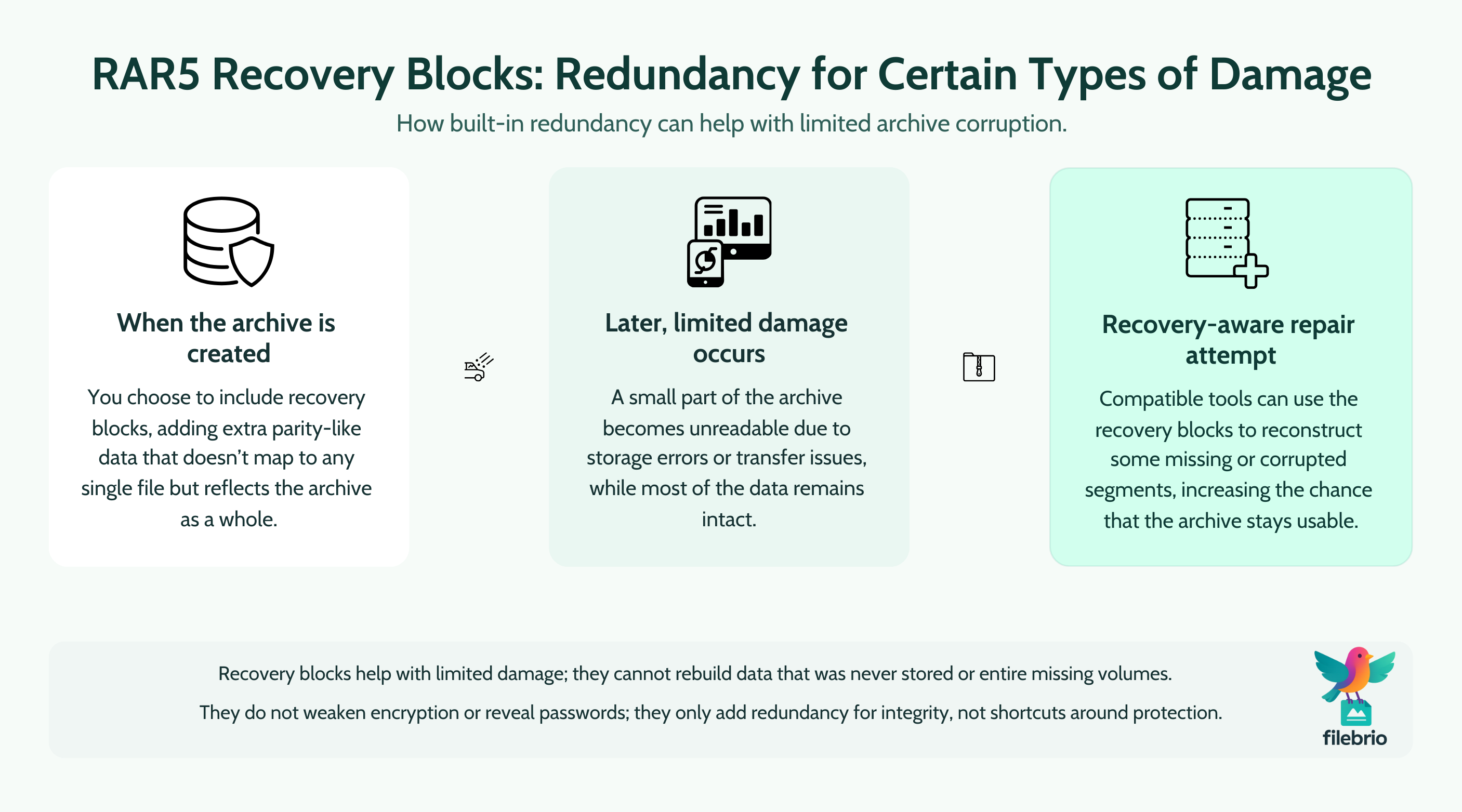
Conceptually, recovery blocks behave a bit like parity data in other error-correcting schemes:
- The archive includes extra data that doesn’t correspond to any single file.
- This extra data is derived from the original archive content using a repeatable algorithm.
- If small parts of the archive later become unreadable, the redundancy can help reconstruct them.
Recovery blocks can be particularly valuable when:
- You store archives on media exposed to wear (portable drives, older HDDs).
- You frequently transfer archives across networks, where interruptions or partial writes can happen.
- You must preserve long-term backups where re-downloading or recreating data is difficult or impossible.
For users who want to dive deeper into redundancy concepts across RAR features, how recovery records safeguard your damaged RAR files ↗️ provides a broader overview of recovery records and .rev volumes without going into low-level repair instructions.
Even with recovery blocks, there are limits. Severe corruption, overwritten segments, or missing volumes can still make an archive unrecoverable. Recovery blocks are a safety net, not a guarantee — they increase your odds, but they cannot defeat cryptography or rebuild data that no longer exists anywhere in the archive.
🔍 Safe Diagnostics: Reading Signals Without Damaging Data
When a RAR5 archive behaves strangely, it’s tempting to “try things” until something works. From a safety perspective, that’s risky: unnecessary writes, repeated failed repairs, or untrusted tools can make a borderline situation worse.
A safer approach is to treat Quick Open Records and recovery blocks as diagnostic signals first:
- Does the archive still advertise Quick Open Records?
- Are recovery blocks present, and does software recognize them?
- Do you see consistent error messages when opening or testing the archive?
To interpret error texts themselves, it helps to understand the broader context of RAR messages. A high-level overview such as how to interpret error messages from your RAR file ↗️ can help you distinguish between routine warnings and signs of deeper structural problems.
When dealing with a sensitive or irreplaceable archive you own:
- Work on a copy first. Preserve the original file in a safe location.
- Avoid tools you don’t trust. Unverified “miracle repair” utilities can damage data or leak private content.
- Start with read-only diagnostics. Many tools can analyze headers, flags, and metadata without modifying the file.
If you want a structured approach to initial checks on a problematic archive, see how to safely diagnose your locked RAR file ↗️ for high-level guidance that focuses on preservation first, action second.
Quick Open Records and recovery blocks are useful clues in this process. If they are intact and recognized, repair attempts may have a better chance of success. If they are missing or clearly corrupted, that’s an early indicator that the archive might require more cautious handling and realistic expectations.
🧰 All-in-One Workspace for RAR Diagnostics (Commercial Block)
When you’re dealing with multiple complex RAR5 archives — large backups, multi-volume sets, or long-term storage — switching between different tools for testing, inspection, and repair can be confusing and error-prone. It also increases the chance of accidentally running an unsafe utility that modifies or uploads your data without clear consent.
An integrated, offline workspace helps you:
- Keep all diagnostics and recovery attempts on your own machine.
- View structural information, Quick Open Records, and recovery blocks in one place.
- Reduce the risk of mixing up copies or accidentally overwriting your only original.
FileBrio RAR Master is part of the broader FileBrio Office Suite and is designed as an all-in-one RAR diagnostics environment for archives you legitimately own. It focuses on transparency and control rather than “one-click magic.”
| Need | How an Integrated Tool Helps |
|---|---|
| Understand what is inside your archive without extracting everything. | Shows high-level metadata, flags, and structure, including RAR5 features, in an organized view. |
| Check whether Quick Open Records are present and healthy. | Highlights indexing-related information so you can set expectations about open speed and diagnostics. |
| Evaluate whether recovery blocks might help with corruption. | Surfaces redundancy indicators and can guide whether a repair attempt is worth the risk. |
| Stay fully offline for privacy-sensitive content. | All operations run locally on your Windows machine — no uploads or hidden network transfers. |
For a broader view of the application’s capabilities, you can review what FileBrio RAR Master can do ↗️ in a feature-focused overview that remains within responsible-use boundaries.
To explore the full FileBrio Office Suite, including RAR Master, from a trusted source, visit the official FileBrio tools download page ↗️.
________________________
FileBrio RAR Master — part of the FileBrio Office Suite — is a privacy-first, offline Windows toolkit for diagnosing and safely regaining access to your own password-protected RAR / WinRAR archives.
- Local processing only — nothing leaves your PC.
- Smart diagnostics to separate password issues from corruption.
- Owner-verified recovery workflows designed strictly for legitimate use.
Reminder: FileBrio RAR Master may be used only with archives you own or are explicitly authorized to access. It performs all analysis and recovery operations locally on your device, without uploading data anywhere.
________________________
🛡️ Protection Best Practices for RAR5 Archives
Quick Open Records and recovery blocks are important, but they are supporting features. Long-term safety still starts with how you create, encrypt, and store your archives in the first place.
Consider the following best practices for archives you own:
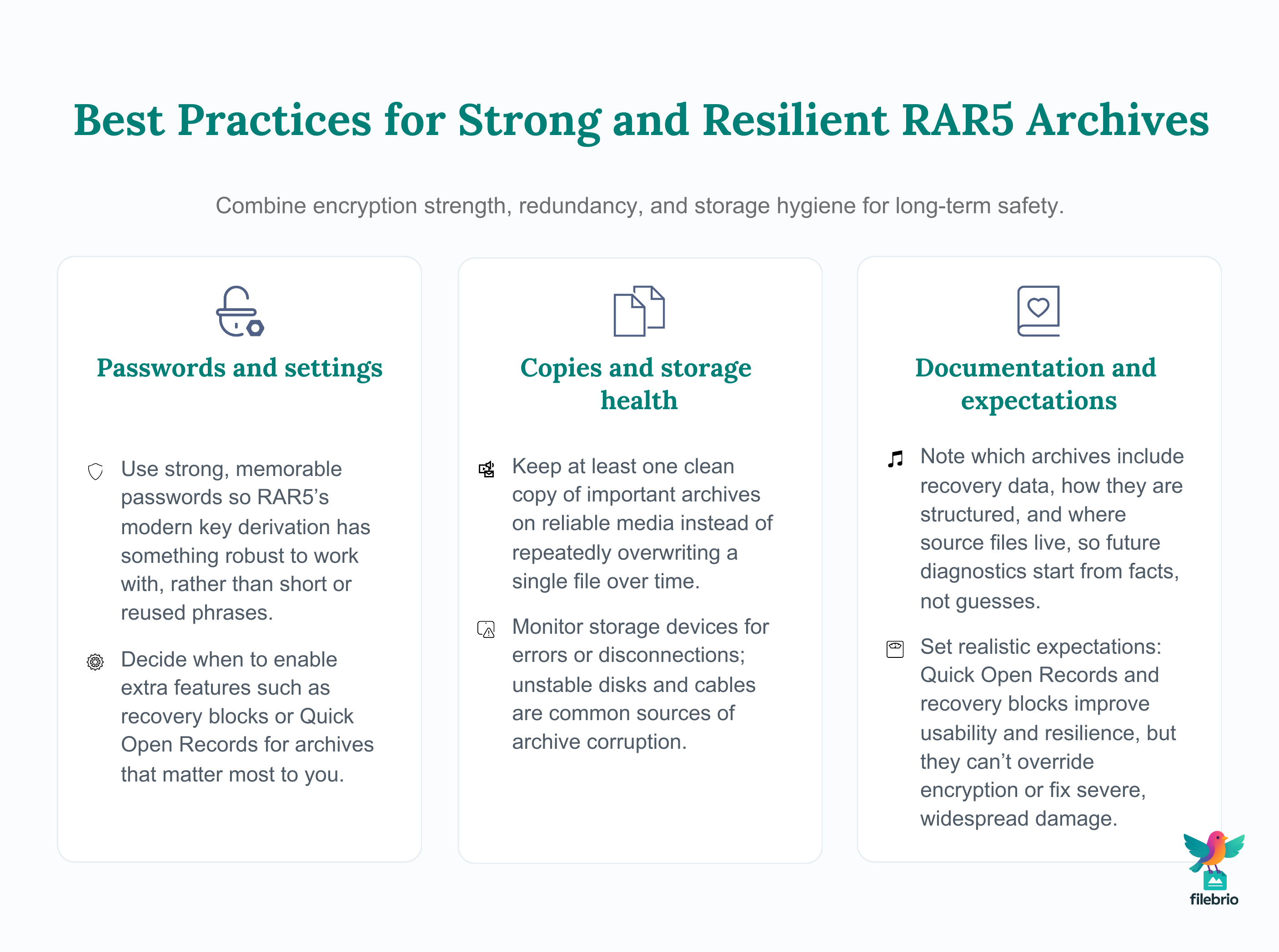
- Use strong, memorable passwords. Short or highly predictable passwords reduce real protection while offering no benefit to usability. Stronger passwords combined with RAR5’s modern key derivation function help protect against unauthorized access.
- Keep at least one clean copy. Store your primary archive on reliable media, and avoid repeatedly overwriting it when making changes. If practical, maintain a separate backup.
- Enable recovery data when it makes sense. Adding recovery blocks will slightly increase archive size, but for critical or long-term data, that trade-off is often worth it.
- Monitor storage health. Drives with growing error counts or frequent disconnections increase the risk of corruption, regardless of file format.
- Document important settings. Make notes about whether you enabled recovery records, how the archive is structured, and where the original source files are stored.
For broader strategic guidance on aligning strong protection with future accessibility, see how to strengthen RAR archive security while preserving future access ↗️. It focuses on balancing defensive measures with realistic long-term usability, especially important for teams and professionals.
It’s also smart to think about where and how you store archives. Good storage hygiene — careful handling of USB sticks, external drives, and cloud copies — can dramatically reduce the chance that you’ll ever need to rely on recovery blocks at all. Practical tips for this are outlined in ways to prevent losing your RAR data on storage devices ↗️.
🔐 Secure Offline Workflow for Sensitive RAR Archives (Commercial Block)
Many people first encounter Quick Open Records and recovery blocks after something has already gone wrong: a drive disconnects mid-transfer, a backup set fails its integrity check, or a long-stored archive suddenly refuses to open. In those moments, rushing to online tools can feel convenient — but it often means sending highly sensitive content to unknown servers.
A safer strategy is to build a privacy-first offline workflow for handling your own RAR archives:
- Diagnostics run locally, so structural details and metadata never leave your device.
- Any attempts to use recovery blocks or test archive integrity are executed on copies you control.
- You retain full visibility into what the software is doing, without hidden cloud components.
FileBrio RAR Master, as part of the FileBrio Office Suite, is designed around these principles. Instead of a narrow single-purpose tool, it provides a structured environment where you can:
- Analyze RAR5 features such as Quick Open Records and recovery blocks at a high level.
- Review archive metadata alongside other document diagnostics in a unified interface.
- Keep sensitive corporate or personal archives entirely on-premises.
If you’re comparing offline, local workflows with browser-based services, the high-level comparison at why offline recovery is safer ↗️ can help you understand the privacy and security trade-offs without promoting risky behavior or specific attack techniques.
And when your priority is long-term responsible use — including licensing, compliance, and support channels — consult FileBrio’s legal and responsible use policy ↗️ for details on how the software is meant to be used within ethical and legal boundaries.
________________________
FileBrio RAR Master — a secure, offline Windows toolkit for regaining access to your own password-protected RAR / WinRAR archives while keeping all data strictly on your device.
- Offline-only processing — never uploads your archives.
- Smart issue detection — password vs corruption.
- Fast recovery workflow optimized for legitimate ownership.
⬇️ Download FileBrio RAR Master
Reminder: FileBrio RAR Master is intended only for archives you own or are explicitly authorized to access. All operations run locally on your PC.
________________________
🤝 When to Seek Help and Prove Ownership
There are situations where Quick Open Records and recovery blocks can’t fully compensate for severe corruption or complex storage failures. In those cases, you may consider professional assistance — but only when you can clearly demonstrate that the archive belongs to you or your organization.
Before involving third parties, think about:
- Internal policies. Does your company have rules governing who may handle encrypted archives and under what conditions?
- Data sensitivity. Does the archive contain personal data, client files, or regulated information that must stay under strict control?
- Proof of ownership. Can you document that you or your organization legitimately owns the files inside the archive?
A high-level overview such as legal factors when accessing your encrypted RAR files ↗️ can help frame the compliance side of these decisions without giving legal advice.
If you need to substantiate that you are working only with your own archives, guidance like how to verify ownership before accessing your RAR file ↗️ can help you think about practical, real-world indicators to document.
When in doubt, favor caution: it is usually better to accept that a severely damaged or inaccessible archive is no longer recoverable than to risk violating privacy, confidentiality, or legal requirements.
⚖️ Legal Reminder
This article is provided for general informational and educational purposes only. Any examples, scenarios, or references to password recovery, archive security, or related tools (including FileBrio RAR Master or similar software) are intended solely to help you better understand how to protect and manage your own data.
You may only apply any techniques, workflows, or tools described here to files and archives that you fully own or are explicitly and verifiably authorized to access. Attempting to bypass, remove, or recover passwords for third-party data without clear permission may violate criminal law, civil law, or internal company policies in your jurisdiction.
Nothing in this article constitutes legal advice. Laws and regulations differ between countries and organizations, and you are solely responsible for ensuring that your actions comply with all applicable legislation, contracts, and internal policies. If you are unsure whether a particular action is lawful or permitted, consult a qualified legal professional before proceeding.
📌 Summary & Practical Takeaways
RAR5’s Quick Open Records and recovery blocks are not optional technical trivia — they are central to how modern RAR archives feel in daily use. Quick Open Records help your software open large or complex archives quickly by providing a compact structural index, while recovery blocks add redundancy that can sometimes save you from moderate corruption or storage glitches.
Used correctly on archives you own, these features:
- Improve responsiveness and usability for large backup archives.
- Increase resilience against certain types of damage and data loss.
- Provide useful diagnostic signals about archive health and structure.
However, they don’t replace the fundamentals: strong passwords, reliable storage, clear documentation, and cautious handling. They also do not override cryptographic protections. If an archive is encrypted and you no longer know the password, Quick Open Records and recovery blocks cannot “reset” or “bypass” that protection.
For long-term, privacy-sensitive work, a dedicated offline environment such as FileBrio RAR Master — used within its responsible-use guidelines — can help you analyze, diagnose, and, where feasible, repair archives you legitimately own, while keeping your data on systems you control.
📚 See Also
- Why RAR5 is More Secure — and What That Means for File Access ↗️
- How RAR Recovery Volumes (.rev) Help Reconstruct Missing Data ↗️
- How File-Type Structure Affects RAR Diagnostics and Feasibility Analysis ↗️
- Best Practices for Managing Large RAR Archives Safely ↗️
- How to Maintain Long-Term Access to Encrypted RAR Archives (Teams & Enterprises) ↗️