

Why Common RAR Passwords Fail: Patterns, Risks, and Security Lessons
Common RAR passwords fail for surprisingly ordinary reasons: convenience, routine habits, and the false confidence that “nobody else would guess this.” This article breaks down why familiar patterns — short words, personal references, simple numbers — offer far less protection than they seem, how RAR encryption reacts to weak choices, and what these failures can teach us about building safer, more resilient password practices. It also outlines how a privacy-first, offline workflow (such as FileBrio RAR Master) helps responsible users evaluate and improve their own archive security without exposing sensitive data.
🧭 Navigation
Important
The information provided in this article applies exclusively to RAR / WinRAR archives for which you have full, demonstrable ownership or properly documented authorization. If you are not the rightful owner of the data, do not directly control it, or cannot clearly prove permission to access it, you must stop immediately. Attempting to access, recover, or modify data without explicit authorization may violate criminal law, civil statutes, corporate compliance requirements, and privacy regulations in many jurisdictions. You alone are responsible for ensuring that your actions are lawful and properly permitted before proceeding.
🧾 TL;DR — Why Common RAR Passwords Keep Failing
Common RAR passwords fail because they rely on predictable human habits: short words, personal references, simple number patterns, and minor variations of familiar terms. These choices feel unique, but they sit in extremely dense areas of the password space—exactly where guessing attempts concentrate first. RAR encryption itself remains strong; what collapses is the real-world effective entropy of the password. RAR5’s modern key-derivation function slows guessing, but it cannot compensate for passwords that are short, reused, or built from widely known patterns.
Most people use weak passwords due to convenience, pressure to finish a task quickly, or fear of forgetting a more complex secret. When these passwords eventually fail—after years of not opening an archive, or following device changes—they reveal how limited their unpredictability truly was. Diagnosing such failures safely requires offline, privacy-first tools that can separate weak-password symptoms from corruption, missing-volume issues, or metadata inconsistencies.
The key lesson is not “memorize something impossible,” but design RAR passwords with more length, more variety, and more deliberate structure—while storing hints or metadata responsibly. Stronger patterns, better retention habits, and local tools like FileBrio RAR Master help ensure your archives stay both protected and realistically accessible without exposing sensitive data to online services.
🤔 Why Common RAR Passwords Feel “Safe” — Until They Don’t
When people protect their own RAR archives, they rarely start from cryptography textbooks. They start from everyday life: birthdays, nicknames, pets, favorite games, phone fragments, or simple word variants. These feel private and meaningful, so they feel safe. From the user’s point of view, “nobody else knows this,” which creates an illusion of security even if the pattern is extremely common in the broader population.
There is also a strong convenience pressure. Setting a password on a RAR archive is often done once, quickly, at the end of a longer task: cleaning a desktop, sending a file, or archiving documents before travel. In that moment, the priority is usually “finish and move on,” not “design a high-entropy secret.” The result is a compromise: something easy to remember and fast to type, but not necessarily resilient.
Later, when access is needed again — possibly months or years afterwards — the same characteristics that made the password easy to remember also make it easy to guess. If your password lives inside a very small mental “vocabulary” (short words, simple numbers, obvious dates), it usually lives inside a very small technical search space as well. Articles about how to assess your situation after losing a RAR password ↗️ often start by mapping exactly this gap between what feels unique and what is actually common.
🧠 How RAR Encryption Treats Weak Passwords
RAR encryption does not “know” whether a password feels meaningful to you. It only sees a sequence of characters that is passed through a key-derivation function and then used to encrypt or decrypt data. If the derived key is correct, decryption works; if not, the archive remains closed. This design deliberately avoids any backdoor-style reset mechanism: there is no way to “prove you forgot” and get a new password for an encrypted RAR file.
From a high-level security perspective, the important point is that RAR’s protection does not weaken simply because a password is short or common. Instead, weak passwords change the economics of guessing. Passwords that belong to a small, predictable region of the search space can often be tested far faster in aggregate than long, random ones. That is why understanding how length and entropy shape password difficulty ↗️ is central to estimating whether a particular choice is realistically strong enough.
Modern RAR formats such as RAR5 add stronger key-derivation functions to slow down large-scale password enumeration. This helps legitimate users by making blind guessing more expensive. However, it does not rescue passwords that fall into obviously weak patterns: short, simple, highly reused, or widely known words remain fragile regardless of the underlying encryption algorithm.
📋 Typical Patterns Behind Weak RAR Passwords
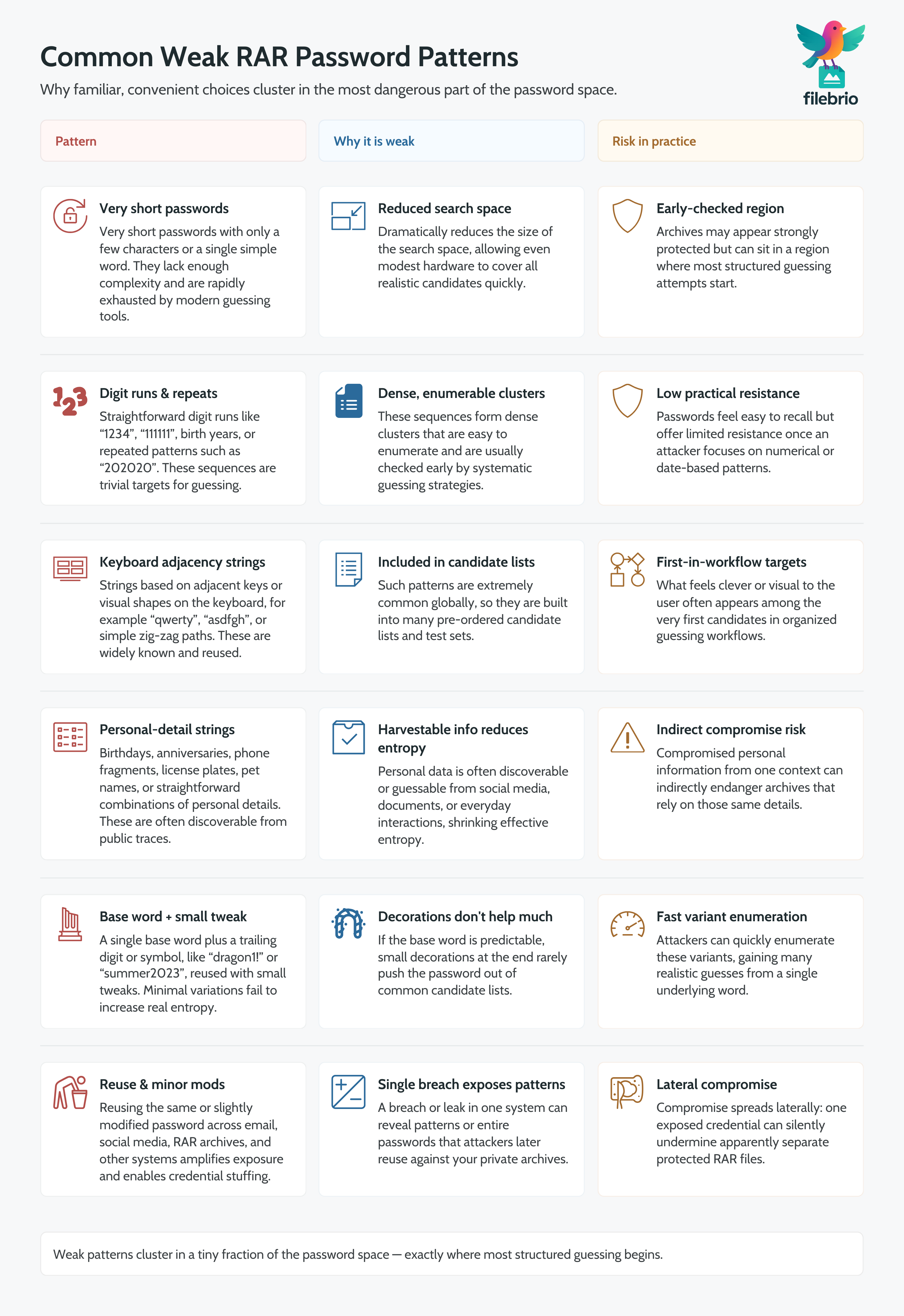
Across many environments, weak RAR passwords tend to share a small set of recurring patterns. These patterns differ in detail from person to person, but the structure is surprisingly similar:
- Very short secrets — passwords with only a few characters, often just one word or number, drastically reduce the total number of possibilities.
- Simple number sequences — monotonically increasing or repeated digits create extremely dense clusters of candidates.
- Keyboard-based patterns — strings based on adjacent keys or simple visual shapes on the keyboard are widely used and easy to anticipate.
- Direct personal data — birthdays, anniversaries, phone fragments, car plates, and similar data appear in many ordinary password sets.
- Minor variations of a single word — adding a trailing digit or symbol to a basic word rarely adds meaningful complexity if the core word is predictable.
- Recycling across multiple services — repeating the same or slightly modified password from email or social media to RAR archives creates cross-system exposure.
The problem is not that any one of these patterns is “forbidden” in isolation. Instead, the problem is that they are so common that they form an extremely dense region of the overall password space. Guides on common mistakes with password-protected RAR archives ↗️ regularly list these behaviors because they systematically undermine the benefits of strong encryption.
🚨 Risks of Predictable and Reused RAR Passwords
Using predictable and reused passwords for your own RAR archives carries several distinct risks, even if you never share the file publicly:
- Lower real security than expected — the archive looks protected, but its effective resistance might be closer to “weak lock on a strong door.”
- Increased exposure if other accounts are compromised — password reuse means that leaks elsewhere may indirectly endanger your private archives.
- False confidence during long-term storage — it is easy to assume that “encrypted” equals “safe forever,” even when the underlying password is fragile.
- Difficulty evaluating real feasibility — if you do lose a weak password, it can be hard to honestly estimate whether lawful recovery is realistic or not.
On the other side, there is also a usability risk: the stronger and less predictable a password becomes, the easier it is to forget if you do not have good personal retention strategies. That is why some articles focus on practical ways to avoid forgetting RAR passwords in the future ↗️, combining strength and memorability rather than sacrificing one for the other.
💼 All-In-One Local Toolkit for Safer RAR Password Use
Many users only discover that their “common but convenient” RAR password has failed when an important archive suddenly becomes inaccessible. By that time, it is often unclear whether the password is weak, simply forgotten, or never recorded correctly in the first place. An integrated toolkit can help you understand what is really going on without sending sensitive archives to third-party sites.
FileBrio Office Suite (including FileBrio RAR Master) is designed around this exact problem set — giving you local tools to diagnose, organize, and safeguard your own RAR archives:
| Challenge | Local Capability | Practical Benefit |
|---|---|---|
| Unsure why a RAR file won’t open | Structure and metadata diagnostics | Helps distinguish weak password issues from corruption or format problems |
| Archiving with “easy” passwords | Guided insights into safer password practices | Encourages moving away from common patterns before they cause losses |
| Concern about privacy when testing access | 100% local, offline processing | No uploads or third-party services involved |
For a broader look at what the suite can do, including diagnostics, recovery support, and archive health checks, you can review the FileBrio RAR Master features overview ↗️. If your situation already involves a forgotten password on an archive you own, the dedicated RAR password recovery feature page ↗️ explains, at a high level, how the app approaches lawful access for legitimate owners.
________________________
FileBrio RAR Master — part of the FileBrio Office Suite — is a privacy-first, offline Windows toolkit for diagnosing and safely regaining access to your own password-protected RAR / WinRAR archives.
- Local processing only — nothing leaves your PC.
- Smart diagnostics to separate password issues from corruption.
- Owner-verified recovery workflows designed strictly for legitimate use.
Reminder: FileBrio RAR Master may be used only with archives you own or are explicitly authorized to access. It performs all analysis and recovery operations locally on your device, without uploading data anywhere.
________________________
📊 What Password Failures Teach About Entropy and Guessing Effort
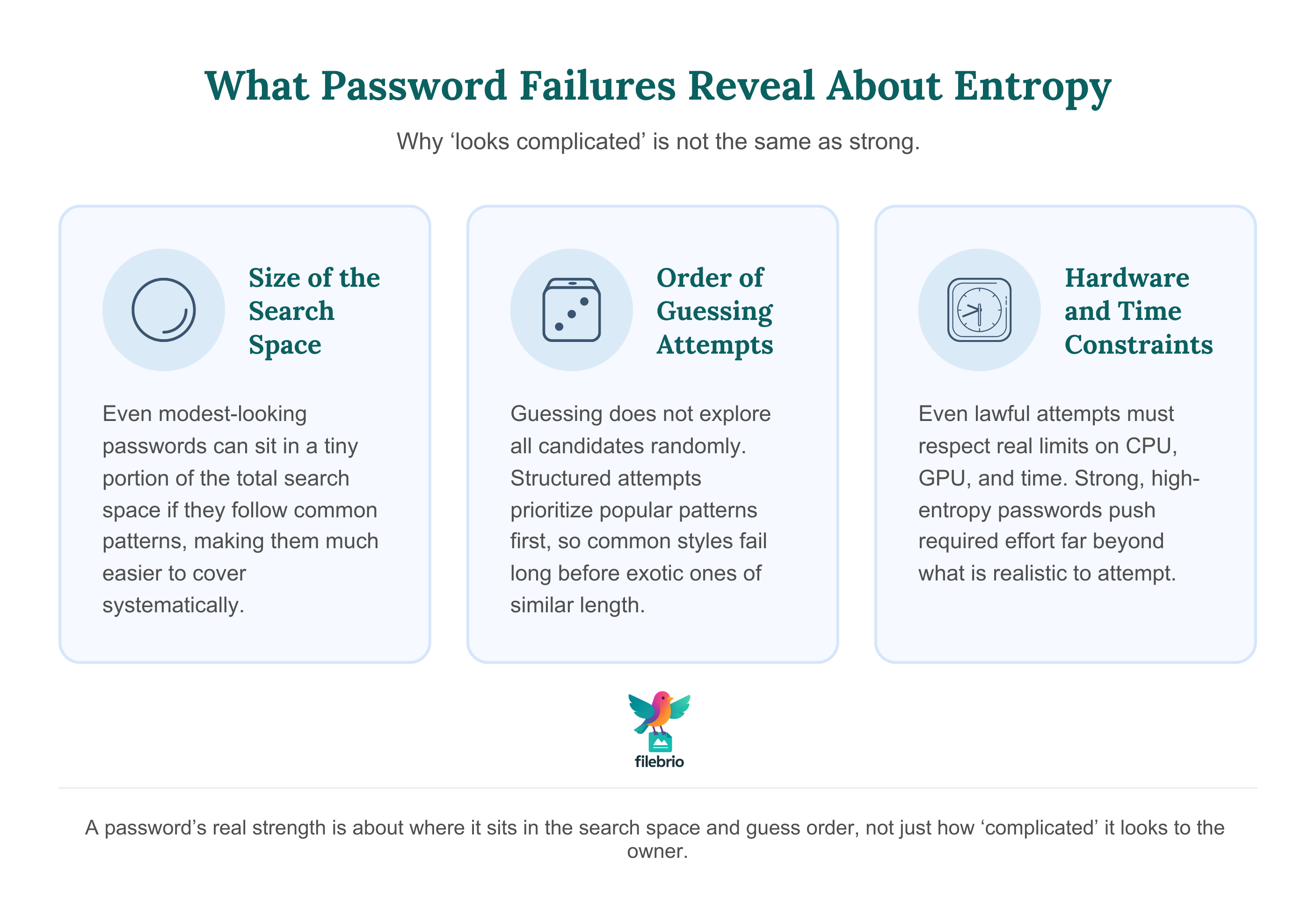
When a common password fails in practice, it often reveals something important about how little effective entropy it contained. Entropy is a way to describe how unpredictable a password is within the space of all possibilities. Two passwords with the same length can have very different entropy if one is built from predictable components and the other is selected from a much broader, less structured pool.
High-level estimates, such as those discussed in time-estimate guides for RAR passwords ↗️, show how factors like length, character set, and structure affect overall difficulty. The key takeaway is that “looks complicated to me” is not a reliable security metric. Instead, you want to think in terms of:
- Size of the search space — how many realistic candidates share the same pattern.
- Order in which patterns are likely to be tested — some structures are checked long before others.
- Hardware constraints and limits — even lawful attempts must respect time and resource boundaries.
This is also where strong key-derivation design in RAR5 matters: it aims to keep guessing expensive even with modern hardware. Articles on strengthening RAR security while preserving future access ↗️ emphasize that improving password quality is only one part of a larger picture involving storage, backup, and long-term planning.
🔁 Habits and Behavior Loops That Keep Weak Passwords Alive
Weak passwords do not exist in isolation. They are part of recurring behavior loops shaped by habit, stress, limited time, and device ergonomics. Some of the most common loops include:
- “I’ll improve it later” — setting a simple password with the intention of changing it soon, then forgetting to do so.
- Copying patterns from other systems — adopting the same style used for social media or email without accounting for different risk models.
- Overestimating obscurity — assuming that unusual personal references are inherently secure, even when they follow common structural patterns.
- Fear of forgetting — deliberately weakening passwords to avoid the anxiety of permanent loss, especially for seldom-used archives.
Behavior-focused resources, such as guides on creating strong yet memorable RAR passwords ↗️, aim to break these loops by providing strategies that respect how human memory actually works. The goal is not to make you feel guilty about past choices, but to give you realistic tools to change patterns going forward.
🛡️ Secure Offline Workflow With FileBrio RAR Master
When you realize that a RAR password relied on weak patterns, the immediate question is: “Can I safely evaluate what is still possible without exposing my data?” Uploading sensitive archives to unknown services or “online utilities” can introduce privacy and compliance risks that are far worse than a forgotten password.
A safer direction is to build an offline-first workflow using trusted local tools. FileBrio RAR Master fits into this workflow by keeping all operations on your own machine while still giving you practical insight into feasibility and limitations. Resources explaining why online RAR tools are often unreliable or risky ↗️ highlight exactly why offline approaches are preferred for sensitive archives.
If you want to compare privacy-focused offline approaches with cloud-based ones, the high-level online vs offline comparison for RAR recovery ↗️ explains how local processing keeps control in your hands. To understand, at a conceptual level, how long lawful recovery might take for a given password style, the password estimation and time-to-crack calculator overview ↗️ describes how FileBrio models timeframes without exposing your archives.
________________________
FileBrio RAR Master — a secure, offline Windows toolkit for regaining access to your own password-protected RAR / WinRAR archives while keeping all data strictly on your device.
- Offline-only processing — never uploads your archives.
- Smart issue detection — password vs corruption.
- Fast recovery workflow optimized for legitimate ownership.
⬇️ Download FileBrio RAR Master
Reminder: FileBrio RAR Master is intended only for archives you own or are explicitly authorized to access. All operations run locally on your PC.
________________________
🔐 Designing Stronger Future RAR Passwords
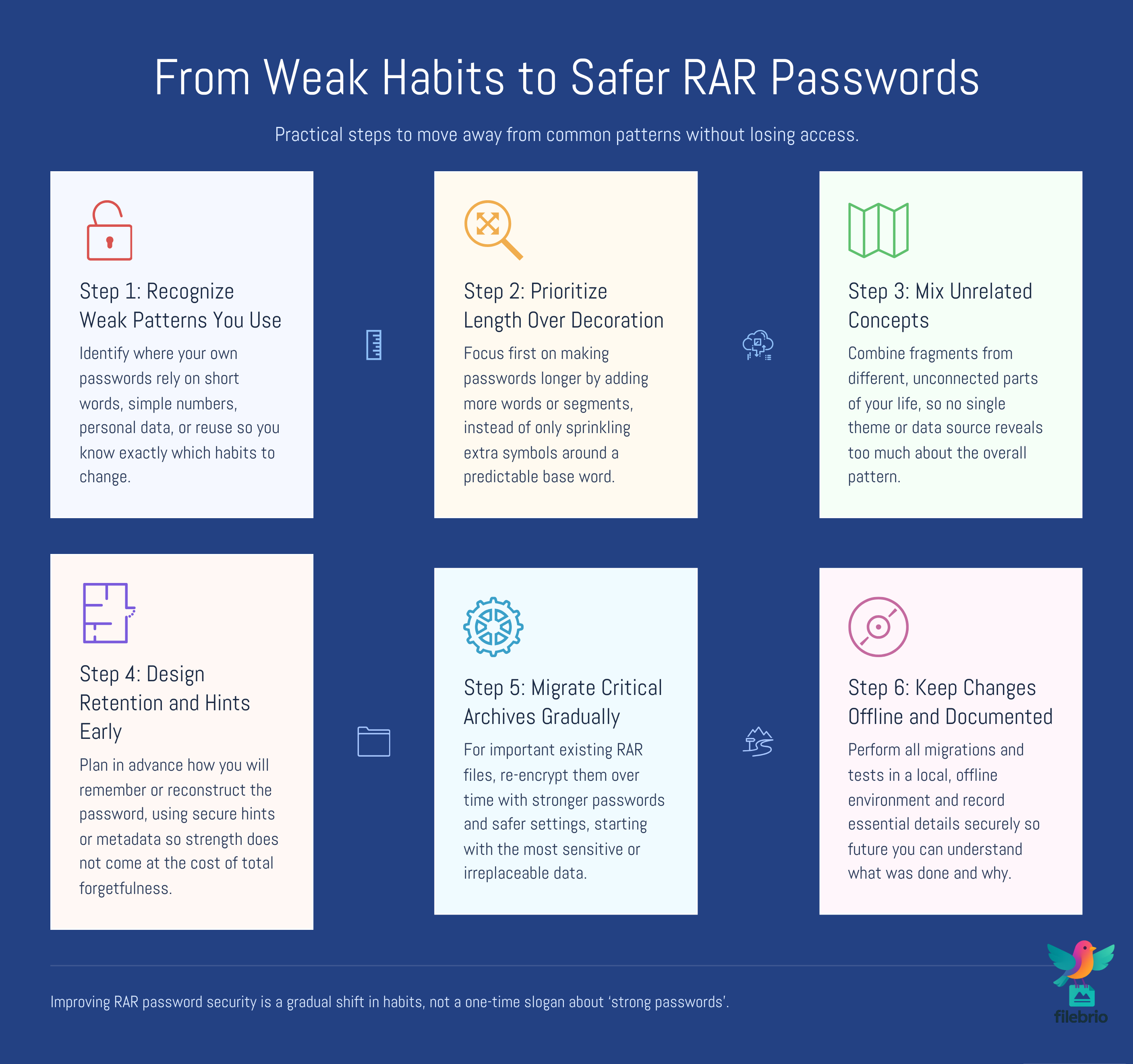
Once you understand why common RAR passwords fail, the next step is to design replacements that are both stronger and sustainable. Purely random strings can be extremely secure in theory, but in practice they are often forgotten or mishandled. A more realistic strategy combines structure, meaningful associations, and careful storage.
Some high-level principles include:
- Increase length before complexity — adding more words or segments can often be more effective than relying solely on unusual symbols.
- Avoid direct personal data — instead of raw birthdays or names, use indirect or transformed references that do not map cleanly to your public information.
- Mix unrelated concepts — combining fragments from different parts of your life makes the pattern harder to predict as a whole.
- Use deliberate “noise” — planned irregularities (position of digits, uppercase choices) add unpredictability if they are not reused everywhere.
Equally important is retention. The best password is still a problem if you cannot recall it in a year. Guides that focus on designing strong but memorable RAR passwords ↗️ and retention strategies for future access ↗️ complement the purely technical view by showing how to integrate these choices into everyday habits.
🧰 Protecting Existing Archives While You Improve
You may already have a mix of archives: some with weak or reused passwords, some with stronger but hard-to-remember ones. Strengthening your approach does not have to mean discarding everything and starting from zero, but it should involve a conscious transition plan.
High-level steps for responsible owners can include:
- Inventory and classification — list your important RAR archives, their purpose, and approximate age.
- Risk-based prioritization — address archives that contain sensitive information or business-critical data first.
- Gradual migration — when feasible, re-encrypt critical archives with improved passwords and safer settings, preserving only the newer versions.
- Secure documentation — record essential password hints or metadata in a safe, access-controlled location so you do not rely solely on memory.
To keep this process privacy-first, consider how offline recovery tools protect privacy better than online ones ↗️. For guidance on aligning your actions with lawful, responsible use, FileBrio provides a dedicated page for support and responsible-use information ↗️. And when you are ready to standardize on a safer toolset, you can obtain the latest version of the suite from the official FileBrio Office Suite download hub ↗️.
⚖️ Legal Reminder and Responsible Use
This article is provided for general informational and educational purposes only. Any examples, scenarios, or references to password recovery, archive security, or related tools (including FileBrio RAR Master or similar software) are intended solely to help you better understand how to protect and manage your own data.
You may only apply any techniques, workflows, or tools described here to files and archives that you fully own or are explicitly and verifiably authorized to access. Attempting to bypass, remove, or recover passwords for third-party data without clear permission may violate criminal law, civil law, or internal company policies in your jurisdiction.
Nothing in this article constitutes legal advice. Laws and regulations differ between countries and organizations, and you are solely responsible for ensuring that your actions comply with all applicable legislation, contracts, and internal policies. If you are unsure whether a particular action is lawful or permitted, consult a qualified legal professional before proceeding.
📚 See Also: Learn More About RAR Password Safety
- How Password Length and Entropy Affect Guessing Complexity ↗️
- How to Strengthen RAR Archive Security While Preserving Future Access ↗️
- How to Create Strong Yet Memorable RAR Passwords That You Won’t Lose in the Future ↗️
- How to Avoid Forgetting RAR Passwords in the Future: Practical Retention Strategies ↗️
- Common Mistakes When Working With Password-Protected RAR Archives ↗️